Fedora 31 on Dell 5591

So in this trying times (thanks, Corona) I got myself a new employer and a new laptop. A Dell 5591 (a.k.a. heavy boi) but as I saw it has a dedicated GPU and lots of RAM next to a second SSD.. I decided it has to dual boot Fedora and Windows. Here my notes/caveats.

  1. Have your bitlocker recovery key ready, Fedora plays with the partitions which locks your drive. You need to unlock it only once after the disk has been manipulated but you have to. (or your admin.. or you need a new windows install!)
  2. disable UEFI Fast/Secure boot in BIOS if you want to run proprietary Nvidia card drivers. (that laptop has a hybrid Intel dedicated / MX130 GPU (optimus?)
  3. nvidia proprietary driver as described by negativo17 is a lot more stable/predictable than the stuff described at Fedora Optimus or

The installer of the live image is as sweet as ever. Everything works right out of the box, no surprises. No trouble. <3
Automatic partitioning actually does a really good job (I shrank the windows/bitlocker volume a bit so i can install next to Windows, just to prove a point – the installer found this and put itself next to it nicely. (see note about bitlocker above)

  • once started the usual things to do are:
  • RPMfusion (free, nonfree, steam, nvidia) – choose :)
  • subpixel font hinting (slight)
  • change scale to 0.9 or 0.95 using gnome-tweak-tool
  • decide screen lock / sleep / suspend / lid close (this seems to change with every fedora release)

About this nvidia/intel hybrid thing… there seems to be a lot of things going on wrt prime/optimus/render offloading.. as I am using Negativo17‘s driver implementation the Gnome feature does not quite work, yet.. at least I have not seen the card work for applications launched that way. There is a lot of information on https://negativo17.org/nvidia-driver/ and it is still a lot less work and actually works compared to the manual kernel module hacking and playing with runlevels as indicated at the RPMfusion website ;)
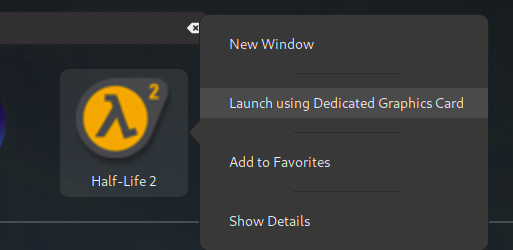
here is hope…

using the flag
__NV_PRIME_RENDER_OFFLOAD=1 __GLX_VENDOR_LIBRARY_NAME=nvidia [appname]
to start an application actually works!

the website hints to edit the steam launch options adding “DRI_PRIME=1 %command%” but for me it is the NV_PRIME_RENDER… string that does the magic. Needs more testing with 32 bit libs.

[andreas@NB-AR ~]$ __NV_PRIME_RENDER_OFFLOAD=1 __GLX_VENDOR_LIBRARY_NAME=nvidia glxspheres64 
Polygons in scene: 62464 (61 spheres * 1024 polys/spheres)
Visual ID of window: 0x2c8
Context is Direct
OpenGL Renderer: GeForce MX130/PCIe/SSE2
61.419987 frames/sec - 68.544706 Mpixels/sec
60.036362 frames/sec - 67.000580 Mpixels/sec

but I haven’t gotten it to work for steam, yet. may be caused by 32 bits and that we are actually running ubuntu stuff here. :)

[andreas@NB-AR ~]$ __NV_PRIME_RENDER_OFFLOAD=1 __GLX_VENDOR_LIBRARY_NAME=nvidia steam 
Running Steam on fedora 31 64-bit
STEAM_RUNTIME is enabled automatically
Pins up-to-date!
/home/andreas/.local/share/Steam/ubuntu12_32/steam

guess I have to amend this string to the .desktop files for the application ( ~/.local/share/applications) or whereever this is set up

I did encounter some suspend issues (device freezing/black screen after resume) so I did follow this article and enabled the traces.. then changed the RTC from CEST to UTC (as recommended) – so far no problems anymore. (but they also hint to the nvidia driver…)

# timedatectl 
               Local time: Sun 2020-03-29 16:09:13 CEST
           Universal time: Sun 2020-03-29 14:09:13 UTC
                 RTC time: Sun 2020-03-29 16:09:13
                Time zone: Europe/Amsterdam (CEST, +0200)
System clock synchronized: yes
              NTP service: active
          RTC in local TZ: yes

Warning: The system is configured to read the RTC time in the local time zone. This mode cannot be fully supported. It will create various problems with time zone changes and daylight saving time adjustments. The RTC time is never updated, it relies on external facilities to maintain it.
If at all possible, use RTC in UTC by calling 'timedatectl set-local-rtc 0'.

# timedatectl set-local-rtc 0
# timedatectl 
               Local time: Sun 2020-03-29 16:09:47 CEST
           Universal time: Sun 2020-03-29 14:09:47 UTC
                 RTC time: Sun 2020-03-29 14:09:47
                Time zone: Europe/Amsterdam (CEST, +0200)
System clock synchronized: yes
              NTP service: active
          RTC in local TZ: no


# echo 1 > /sys/power/pm_trace
# systemctl suspend
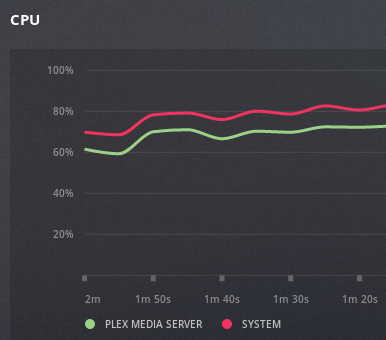
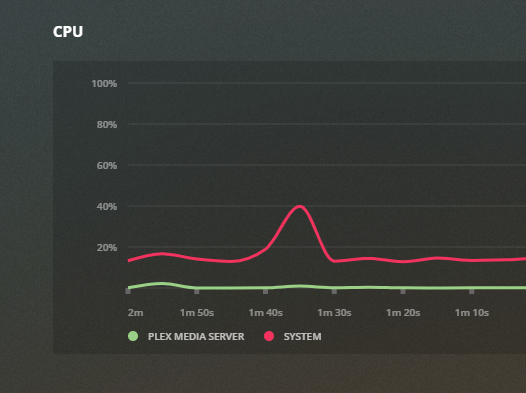
new server build log (18.04 LTS)

decided to refresh my poor server that had failing disks and bring it to the next level.
– Ubuntu 18.04 LTS on an SSD as a base. (steam and plex still seem to love ubuntu)
– install SSHD and start from scratch.
– differnet harddisks instead of LVM
– replace my AMD FX with a Ryzen 5
– add a GTX1060 for video transcoding and steam
– enable steam link
– throw nextcloud on it
– different mountpoints/drives for nextcloud and plex
– an SSD for system/root
– two factor authentication
– and…of course.. it has to run minecraft server ^^

computing power is x4 now while power consumption has halved, I will probably throw some hypervisor and another SSD for that on it, too. I want to play with pfsense and SDN some more and always need a public host (next to my VPS)

NVENC 2 stream limit

It seems some kind soul on the internet found a way to remove the 2 NVENC stream limit from the non-tesla (quadro) cards

tested and approved ^^

https://github.com/keylase/nvidia-patch

before:

+-----------------------------------------------------------------------------+
| NVIDIA-SMI 440.44 Driver Version: 440.44 CUDA Version: 10.2 |
|-------------------------------+----------------------+----------------------+
| GPU Name Persistence-M| Bus-Id Disp.A | Volatile Uncorr. ECC |
| Fan Temp Perf Pwr:Usage/Cap| Memory-Usage | GPU-Util Compute M. |
|===============================+======================+======================|
| 0 GeForce GTX 106... Off | 00000000:1F:00.0 Off | N/A |
| 41% 46C P2 35W / 120W | 921MiB / 3016MiB | 0% Default |
+-------------------------------+----------------------+----------------------+

+-----------------------------------------------------------------------------+
| Processes: GPU Memory |
| GPU PID Type Process name Usage |
|=============================================================================|
| 0 1442 C /usr/lib/plexmediaserver/Plex Transcoder 331MiB |
| 0 1644 C /usr/lib/plexmediaserver/Plex Transcoder 517MiB |
| 0 1964 G /usr/lib/xorg/Xorg 59MiB |
+-----------------------------------------------------------------------------+

after:

Wed Jan 15 21:16:14 2020
+-----------------------------------------------------------------------------+
| NVIDIA-SMI 440.44 Driver Version: 440.44 CUDA Version: 10.2 |
|-------------------------------+----------------------+----------------------+
| GPU Name Persistence-M| Bus-Id Disp.A | Volatile Uncorr. ECC |
| Fan Temp Perf Pwr:Usage/Cap| Memory-Usage | GPU-Util Compute M. |
|===============================+======================+======================|
| 0 GeForce GTX 106... Off | 00000000:1F:00.0 Off | N/A |
| 41% 48C P2 41W / 120W | 1429MiB / 3016MiB | 19% Default |
+-------------------------------+----------------------+----------------------+

+-----------------------------------------------------------------------------+
| Processes: GPU Memory |
| GPU PID Type Process name Usage |
|=============================================================================|
| 0 1442 C /usr/lib/plexmediaserver/Plex Transcoder 331MiB |
| 0 1644 C /usr/lib/plexmediaserver/Plex Transcoder 517MiB |
| 0 1964 G /usr/lib/xorg/Xorg 59MiB |
| 0 2617 C /usr/lib/plexmediaserver/Plex Transcoder 357MiB |
| 0 2684 C /usr/lib/plexmediaserver/Plex Transcoder 149MiB +-----------------------------------------------------------------------------+

running 5 simultaneous 1080p transcodes on a GTX1060 now (if I want it to…total overkill as usual but hey… ;)

using CPU transcoder for HEVC source material
using NVENC – I can use the CPU for other tasks

details:

find out what directory nvidia is installed (CACHEDEV2 for me) and add the lib directory to the dynamic linker ld.so.conf

[admin@xxxxlib]# export TERM=xterm-256color
[admin@xxxxlib]# vim /etc/ld.so.conf

add at the bottom:
/share/CACHEDEV2_DATA/.qpkg/NVIDIA_GPU_DRV/usr/lib

then run ldconfig
[admin@xxxxlib]# ldconfig

thanks, https://blog.slowb.ro/fix-terminal-capability-cm-required/

now nvidia-smi should work:

[admin@NAS65211F bin]# ./nvidia-smi
Sat Dec 2 10:11:46 2023
+-----------------------------------------------------------------------------+
| NVIDIA-SMI 515.48.07 Driver Version: 515.48.07 CUDA Version: 11.7 |
|-------------------------------+----------------------+----------------------+
| GPU Name Persistence-M| Bus-Id Disp.A | Volatile Uncorr. ECC |
| Fan Temp Perf Pwr:Usage/Cap| Memory-Usage | GPU-Util Compute M. |
| | | MIG M. |
|===============================+======================+======================|
| 0 NVIDIA GeForce … Off | 00000000:01:00.0 Off | N/A |
| 40% 29C P8 N/A / 75W | 4MiB / 4096MiB | 0% Default |
| | | N/A |
+-------------------------------+----------------------+----------------------+

+—————————————————————————–+
| Processes: |
| GPU GI CI PID Type Process name GPU Memory |
| ID ID Usage |
|=============================================================================|
| No running processes found |
+—————————————————————————–+
[admin@NAS65211F bin]#

check the driver version, download and install the patch:

https://github.com/keylase/nvidia-patch

for some reason the automatic patching does not work anymore so its manual now.
https://emby.media/community/index.php?/topic/102522-tips-to-get-the-most-out-of-your-nvidia-gpu/

not in the mood right now. fuck nvidia

blocking youtube, insta and facebook once and for all

I have been busy for a while figuring out just how much freedom and control I need to use to keep my children from harm from the online world.. after all I know how much trolling is going on and how much hate is being generated/amplified there.
At the same time I am still that blind optimist that believes as long as people talk to each other eventually the good guys will pravail and win because they work together.
Now, with facebook and google using smart algorithms mining big data that they generate from millions of hosts and applying that with addiction-generating systems that generate revenue.. I must admit that is a) very smart, b) a dick move and by all means c) unacceptable if it happens on the back of innocent, uncorrupted and ignorant beings (namely my children)

so I have been using google family link to control the devices of my kids for a while now.
I don’t care what websites they use and who they chat with, they need to learn that some people don’t want to be your friend themselves.
But I have created a blacklist that contains three words:
– youtube
– instagram
– facebook

these three started out wonderful and creative and are now what McDonalds feels like. Fat, lethargic and only interested in making more money. In my eyes they don’t exist anymore but I realize how much the peers of my children are pushing them back and always back again into these platforms.
Everyone who knows a bit about data mining will understand that even without a facebook account, the fact that 5 of your friends have one and they have your number in their address book, that facebook app has access to that address book (to help you “find your friends faster”) and that they get location and demographic information about you by banner ads and tracking cookies that are sent to your device will pretty much tell them all about you without you having an account. It is highly efficient and super scary.

So… while I can more or less control the mobile devices I can not do this for the PC at home.
Also I was looking for a time keeper to control how many hours they are busy.
(Again.. I don’t care if it’s music videos, reddit or minecraft.. but there has to be a balance)

Also laptops can be carried to the neighbors, so installing a pi-hole or DNS blocklists won’t work once they are at the neighbors, whos mother things I am paranoid (I am!) so.. another solution was needed. > see below

Continue reading

automated Plex backup 2019 style

2019 – ubuntu is now using systemd (18.04LTS), my home server is running a ryzen processor, CIFS is almost as fast as NFS now and the automated rsync jobs have stopped.
Time to re-build them!
Note: This is a closed system, I am not taking care of security here much as my network is considered “secure” – this is probably not going to win many security awards

Step 1: Networking

Ubuntu 18.04 uses systemd and netplan so no more hacking around /etc/network/interfaces. The config is in /etc/netplan – the default file is 50-cloud-init.yaml

network:
version: 2
ethernets:
enp2s0:
dhcp4: false
addresses:
- 10.0.0.2/24
mtu: 9000

and apply the settings with sudo netplan apply
and verify withip addr
ST,UP,LOWER_UP> mtu 1500 qdisc fq_codel state UP
however, this did not bring the mtu to 9000 so we need another thing:
> sudo ip link set mtu 9000 enp2s0
and from what I hear this may not be transitory / survive reboots.. in that case it needs to go into the startup scripts.
Anyway: that’s what I wanted:
enp2s0: MULTICAST,UP,LOWER_UP> mtu 9000 qdisc fq_codel state UP

Step 2: Mount the NAS

verify shares are working (NFS and CIFS)

andreas@plexcloud:/$ showmount -e 10.0.0.1
Export list for 10.0.0.1:
/shares/public *
/shares/andreas *
andreas@plexcloud:/$ smbclient -L //10.0.0.1 -U andreas
WARNING: The "syslog" option is deprecated
Enter WORKGROUP\andreas's password:
Sharename       Type      Comment
---------       ----      -------
public          Disk      public
andreas         Disk      Andreas sein Zeug

try to mount is manually: (as root because I will mount using fstab later)

root@plexcloud:~# mount -t cifs -o username=andreas,password=xxxxxxxxxxxx,iocharset=utf8,file_mode=0777,dir_mode=0777,soft,user,noperm,vers=1.0 //10.0.0.1/public /mnt/NAS/

root@plexcloud:~# ls /mnt/NAS
[data]

actually. it’s 2019.. I changed my mind wrt fstab.. let’s use automount (As I never know if my NAS will be up or not while I move to my new place)
https://help.ubuntu.com/community/Autofs <<< that’s supposed to be easy?

apt install autofs
edit /etc/auto.master and add the line
/mnt /etc/auto.smb
(which should tell autofs to look at /etc/auto.smb and perform its magic in /mnt) – basically mounting SMB shares in the /mnt directory. CIFS would be a better way.. which doesn’t work for me.. so it’s the manual mode for me for now

for the lazy me: edit fstab and add:
//10.0.0.1/public /mnt/NAS/ cifs username=YOURUSERNAME,password=YOURPASSWORD,iocharset=utf8,file_mode=0777,dir_mode=0777,soft,user,noperm,vers=1.0
vers=1.0 is to bypass the “host is down” error (assuming proper authentication should be used) and the rest is to bypass said authentication and not to fuck around with file permissions (just behave like a fucking USB stick, damn it.. no one else is using you!)
yeah, I know.. “guest” would probably work, too.. but I had bad experiences with permissions afterwards.

so now I have a mountpoint, let’s do backups!

Step 3: test and automate rsync jobs

motivation: rsync with delete – whatever I delete from the source can be deleted on the backup, too
full sync for the server directory, only check by size for the media files
I like -v and “–progress” as it gives me an indication what is going on (on the first run…)
however not in the scripts, a simple –stats will have to do, there…

so for the server backup:
rsync -ahv /var/lib/plexmediaserver/ /mnt/NAS/backups/plexmediaserver/ --progress --delete --stats --dry-run
non-verbose and “live” mode:
rsync -a /var/lib/plexmediaserver/ /mnt/nas/backups/plexmediaserver/ –delete

(I removed the -z because the data dir is 7 GB and the compression too too long on that stupid atom-based nas)

and for files:
rsync -ahv /plex/ /mnt/NAS/plex/ --progress --size-only --delete --stats --dry-run
and non-verbose:
rsync -aq /plex/ /mnt/NAS/plex/ --size-only --delete

first version of the script used copy but this took AGES to finish so rsync all the way now. After all it seems my old seagate NAS does rsync :D

the /var/lib/plexmediaserver dir still takes way too long.. so I will tar and zip it and rsync it over instead – much faster – also –delete-source-files is handy (as mv can not overwrite and I don’t feel good calling rm -rf in a script executed by root….)

tar -zcvf plexmediaserver.tar.gz /var/lib/plexmediaserver/

finished script: added to crontab

0 4 * * * cd /home/andreas && sh backup_plex.sh>>plex_backup.log

#!/bin/bash
echo "+++stopping plex media server"
systemctl stop plexmediaserver.service
sleep 5
echo "+++backing up server and cache"
#rsync -ahz /var/lib/plexmediaserver/ /mnt/NAS/backups/plexmediaserver/ --stats --delete
tar -zcf /opt/plex/plexmediaserver.tar.gz /var/lib/plexmediaserver/
echo "+++copying tarball over to NAS"
#rsync -ahv /opt/plex/ /mnt/NAS/backups/plex/ --remove-source-files --progress --stats
rsync -ah /opt/plex/ /mnt/NAS/backups/plex/ --remove-source-files
echo "+++restarting plex media server"
systemctl start plexmediaserver.service
echo "+++server backup complete - now for the files"
#rsync -ahv /plex/ /mnt/NAS/plex/ --progress --size-only --delete --stats
rsync -ah /plex/ /mnt/NAS/plex/ --size-only --delete

ubuntu 19 vanilla gnome

The ubuntu flavor and look+feel has been added to the stock gnome3 – which is not much but I dislike the fat font and the unity-style dock.. also there is something about that purple.

anyway, easy fix: get these packages (in order of how much you want to be gnome-ified)
1) apt install gnome-session
2) update-alternatives –config gdm3.css (select gnome-shell.css)
3) apt install ubuntu-gnome-default-settings
4) apt install vanilla-gnome-default-settings vanilla-gnome-desktop

key differences are:

  • No Ubuntu Dock
  • No app indicator support
  • Adwaita GTK and icon theme
  • Cantarell font is used
  • Default Shell theme
  • App windows only show a ‘close’ button
  • Symbolic icons used in App Menu
  • Activities Hot Corner

sources:
https://itsfoss.com/vanilla-gnome-ubuntu/
https://technastic.com/install-stock-gnome-shell-on-ubuntu/

the laws of humanity

  1. A human should not harm the world (the universe) or by inaction allow the world (the universe) to come to harm.
  2. A human should not harm humanity or by inaction allow humanity to come to harm, except where this behavior would conflict with the first law.
  3. A human should not harm another human or by inaction allow another human to come to harm, except where this behavior would conflict with the previous two laws.
  4. A human should protect its own existence, except where such protection would conflict with the previous three laws

adapted/stolen from Eric Bubela – ‘stuck’
who adapted it from the laws of robotics as defined by Isaac Asimov

Misquoting

I really want to know when these started to be used in a negative/derogatory way.. as if someone had the intention to keep people “low” in order to.. .well.. what?

  1. Blood is thicker than water.
    The full saying is actually “the blood of the covenant is thicker than the water of the womb.” Basically, it means exactly the opposite of what most people think. It refers to the idea that the bonds you choose to make can mean much more to you than the ones you were born into and don’t have much of a say in.
  2. Curiosity killed the cat.
    This phrase continues: “but satisfaction brought it back.” This makes sense, considering the whole idea that cats get nine lives. I often heard the first half when I was little and asking too many questions, but the full phrase suggest that there is no such thing as too many questions.
  3. A jack of all trades is a master of none.
    This saying got cut short as well and originally said “A jack of all trades is a master of none, but oftentimes better than a master of one.” Unlike what our version would lead you to believe, having multiple interests but not being an expert in anything could actually prove advantageous.
  4. Great minds think alike.
    “Small minds rarely differ” is the following line to this once reassuring quote. I would advise you try not to think about that too much the next time you and your classmates are on a roll with your group project, sometimes phrases get cut short for good reason.
  5. Money is the root of all evil.
    Again, the original version is a little longer. This biblical phrase originally reads “The love of money is the root of all sorts of evil.” There’s a difference in making more money than you could possibly spend and keeping it.
  6. My country, right or wrong.
    This is often used to justify supporting bad wars, the original actually says “My country, right or wrong; if right, to be kept right; and if wrong to be set right.” This puts the responsibility on the citizen to make sure their country is a good one, not the other way around.
  7. Starve a cold, feed a fever.
    I’ve only heard this a couple times and it could have multiple meanings just by reading it differently. Not only is it terrible advice, it’s poorly quoted. The original states “if you starve a cold, you’ll have to feed a fever.” Now, that’s advice I can take to heart.

https://www.theodysseyonline.com/7-phrases-youve-been-misquoting