Taming AI in Android

couple of things because I am bored of searching them every time my phone gets updated and google tries to shove AI stuff down my throat again. So let’s tame Android AI.

Note: this is based on Xiaomi HyperOS 2 and the diffuculty increases with each step but don’t be afraid.. it’s only yours after you have voided the warranty! :)

1 – The digital assistant / Power Button shortcut

Currently there is a trend (android 14/15) to launch the digital assistant instead of powering off your phone. That’s easy to fix.

go Settings > Additional settings > Gesture shortcuts > Launch digital assistant
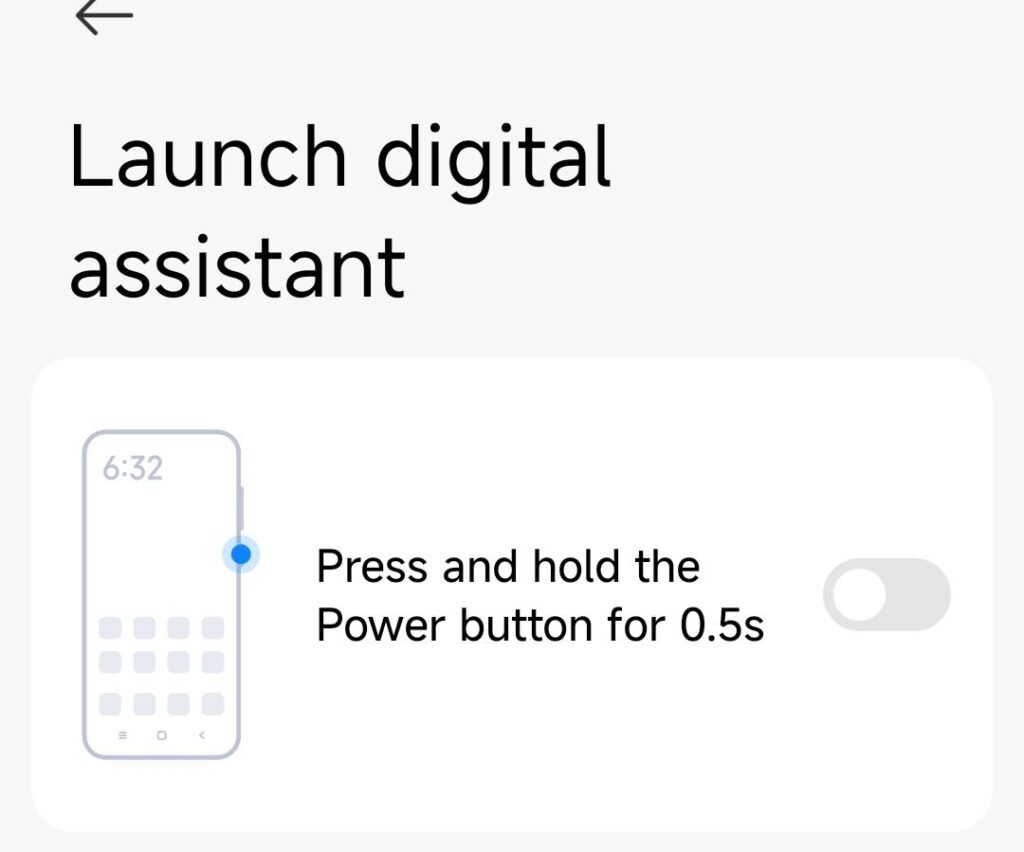
while disabling the digital assistant shortcut there, you might also want to enable power off when pushing the power button.. because that’s what a power button is supposed to do? Damn I’m old for demanding this kind of stuff….

2 – circle to search / invoking AI

I may actually want to keep that one.. but I keep accidentially triggering it and then.. everything that is on my screen at that very moment gets sent to google’s datacenter for analysis.. useful when you want to learn what you are looking at but can be a big privacy risk. use at your own discretion. Here is how to disable it.

Under Settings > Home screen > System navigation. Choose if you are using gestures or virtual buttons. depending on your choice, set up what holding down the home button or the fullscreen indicator does. If you disable “circle to search” it won’t pop up again.
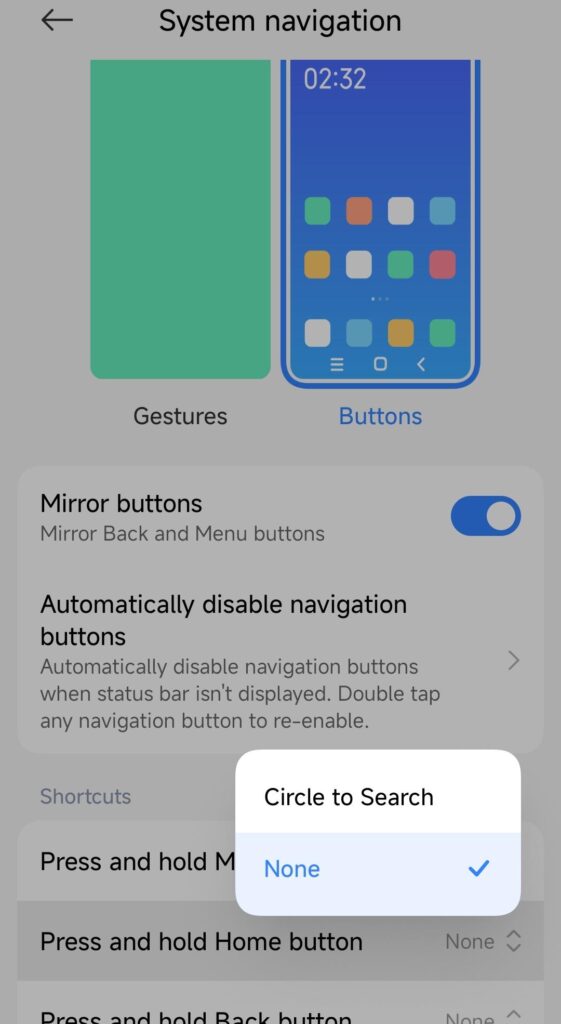
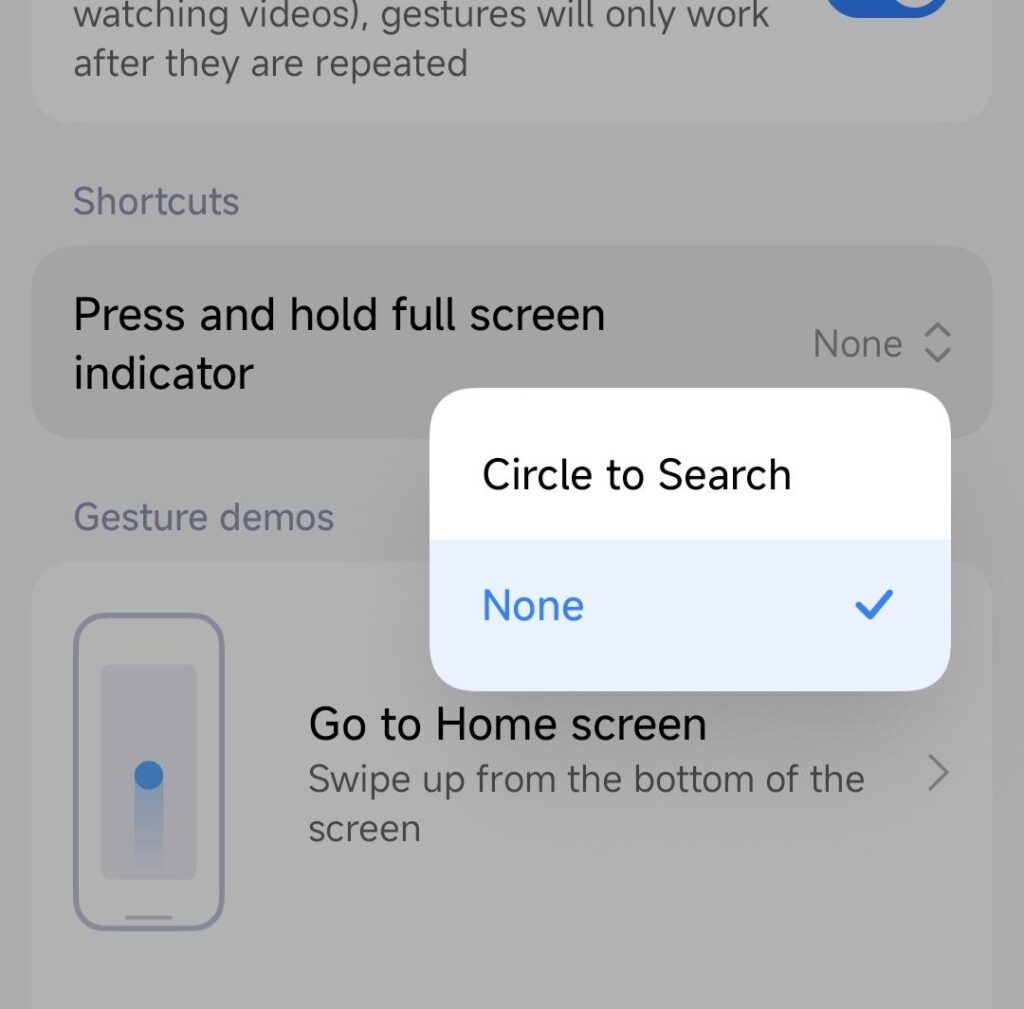
you can also disable it entirely, but that comes later.

3 – disable the assistant shortcut

Also called “corner swipe” – that one is hidden nicely. I hate this kind of dark patterns.. I keep triggering it with my hand when I use the phone. The shortcut is swiping up from the bottom right corner of the screen.

Go Settings > Apps – on the top right corner push the three dots.
select “Other settings”
Choose “Default apps” and on the bottom select “Assist and voice input”
choose “None”
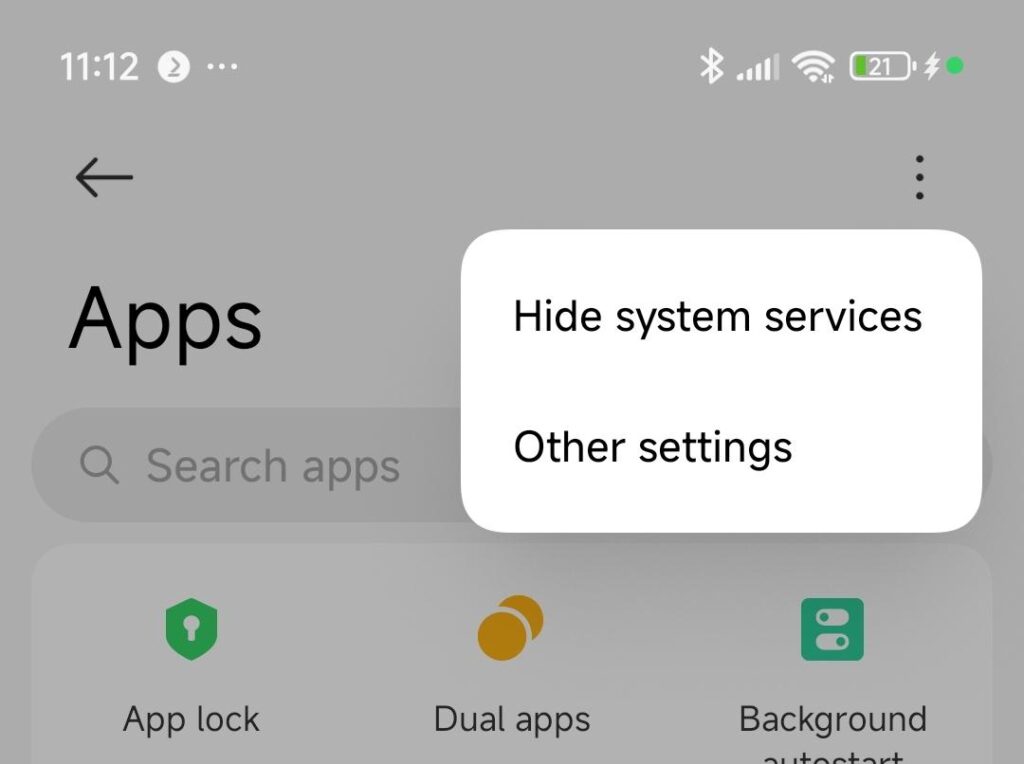
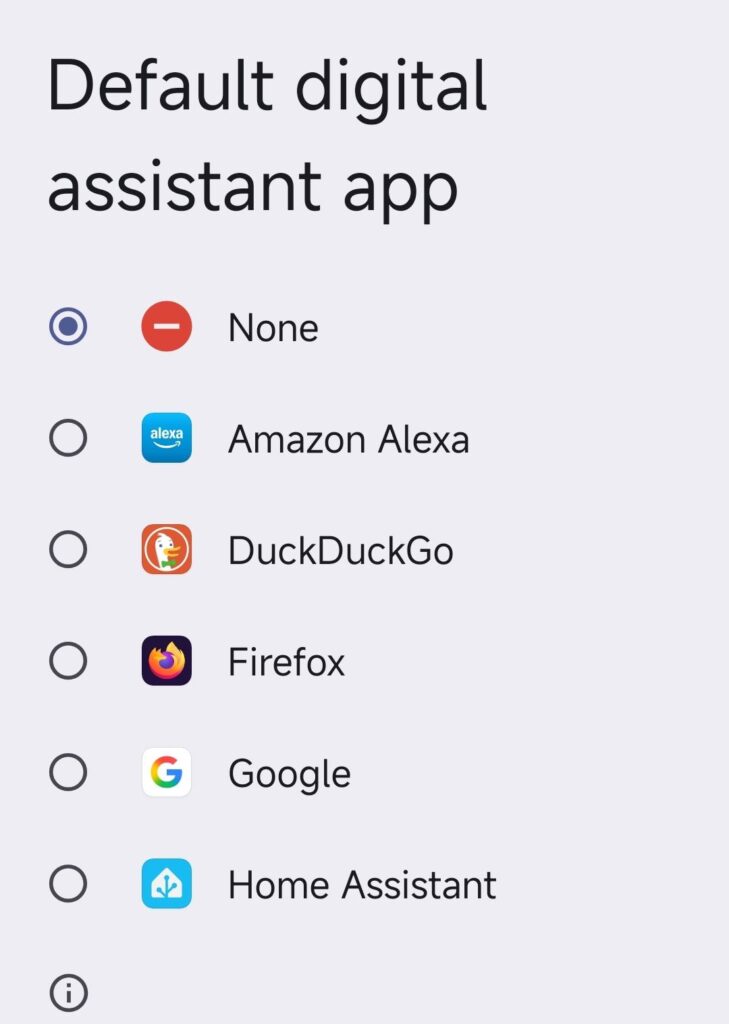
this disables the corner swipe shortcut.

4 – from here it gets difficult.. we will remove google’s assistant entirely

(this is not for the faint of heart.. so only do this when you are not afraid re-installing your phone if it fails)

The problem is: google being google they want you to accidentially trigger and re-activate the assistants. like this:
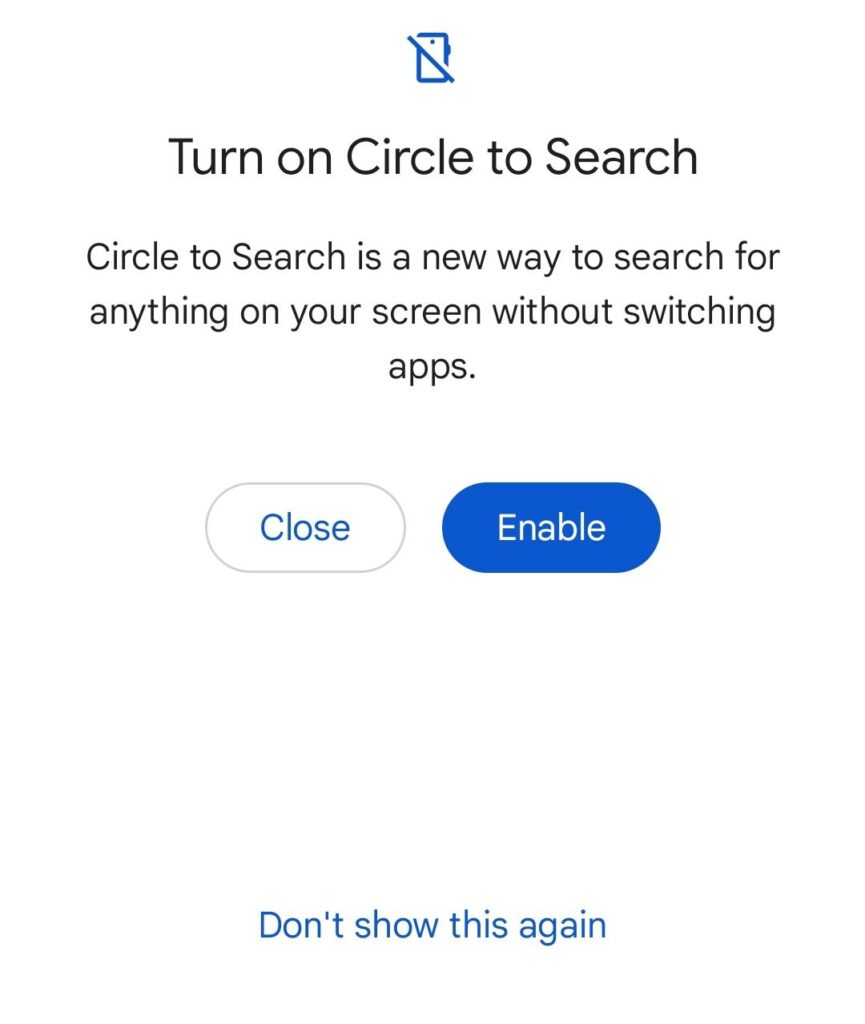
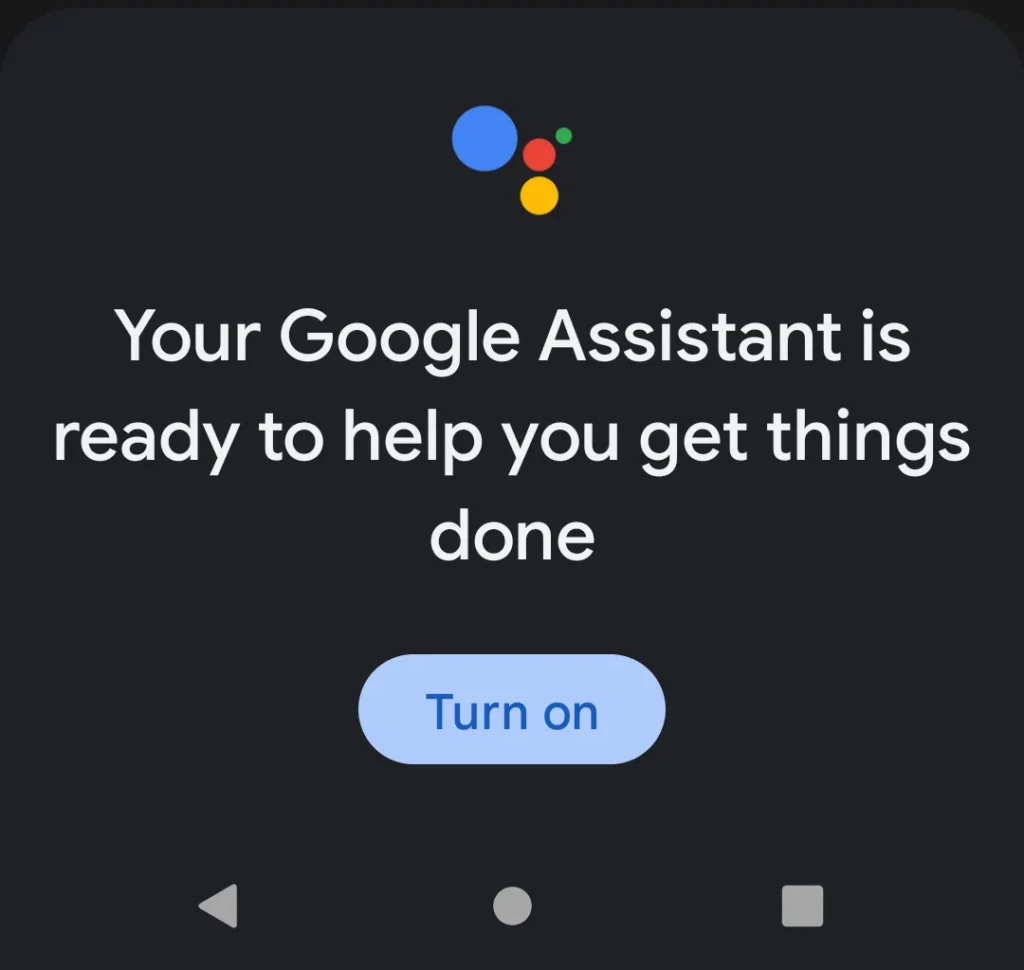
so let’s just tear it out for good. any major update will probably bring this back but then just repeat this step.

First of all: you need developer options enabled in Android. This is a step that can cause your warranty to be void, your phone to catch fire or eat your children.. so.. enter at your own risk.

Go settings > About Phone and tap 10 times on the OS version (sometines the serial number.. this is differnt for every model). Confirm the warning and you have enabled developer options.

A new option has appeared in settings > Additional settings > Developer options. Go there.

Enable the master switch on top, scroll to the “Debugging” section and enable “USB debugging”
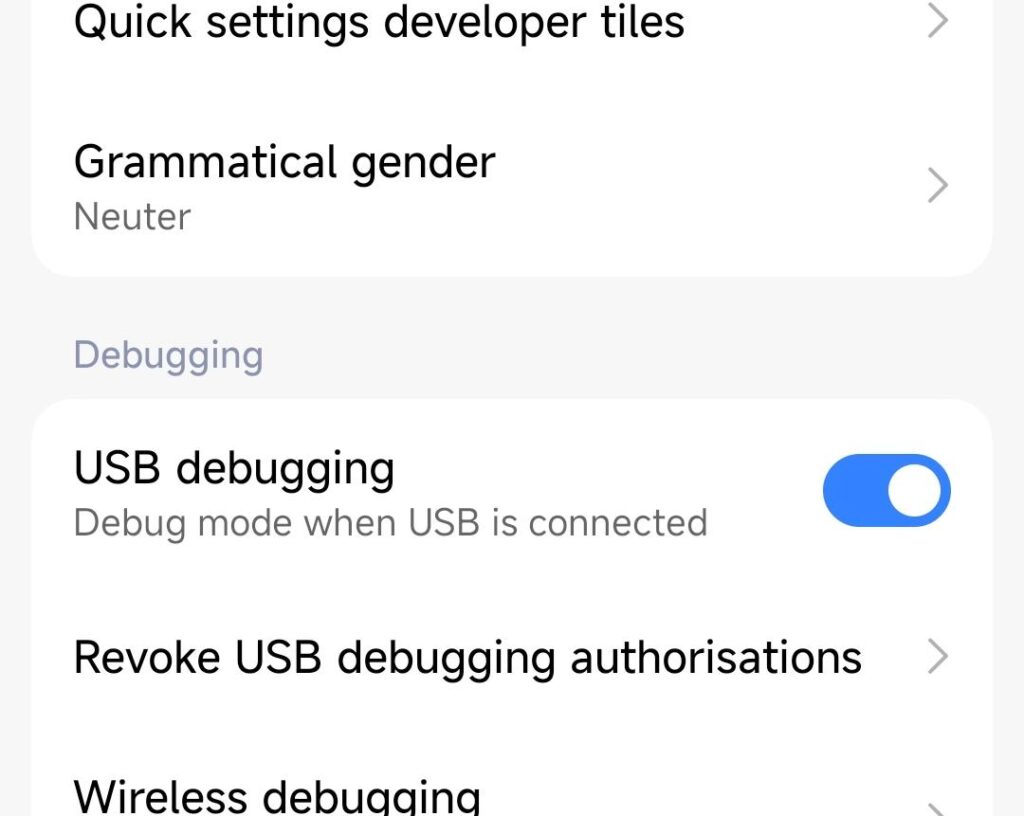
Next, grab a PC, install Android platform tools (windows/linux/mac) and your device drivers.
https://developer.android.com/tools/releases/platform-tools

your phone’s drivers are dependent on the manufacturer. Google’s (for pixel) are here:
https://developer.android.com/studio/run/win-usb

Xiaomi’s (and others) are here:
https://developer.android.com/studio/run/oem-usb
https://bigota.d.miui.com/tools/xiaomi_usb_driver.rar

once installed, go to github and find a “debloat” suite for Android. like this one:
https://github.com/0x192/universal-android-debloater

once you get it to run, find “bard” and remove it. “bard” is Gemini’s internal name. Also search for “googleassistant” and “okaygoogle” – remove them too.
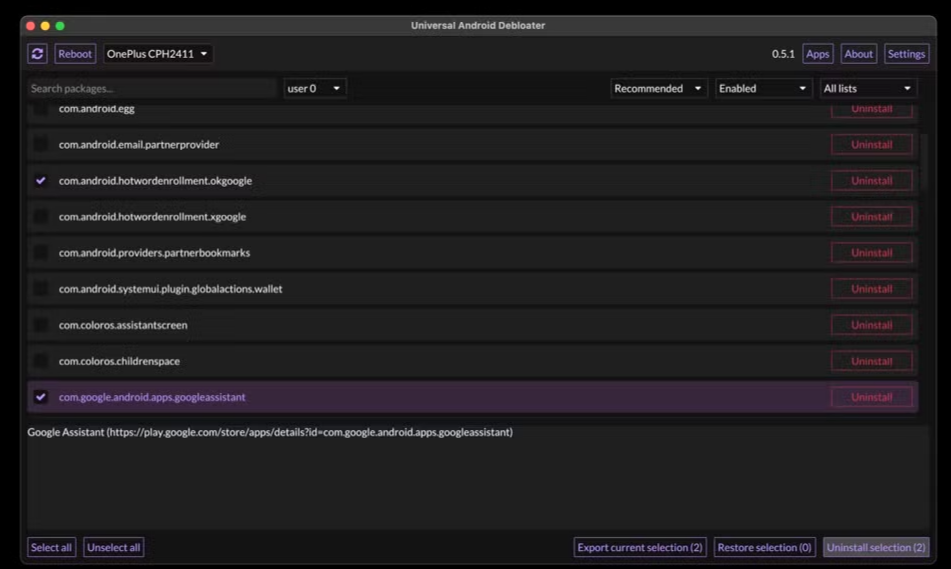
click “uninstall selection” – reboot your phone – cross your fingers and enjoy assistant-free android (until the next software update, when it will come back disguised as someone else or under a different name.. but I will update this post)

google assistant be like…

5 – bonus (I will pay you a coffee if you tell me how)

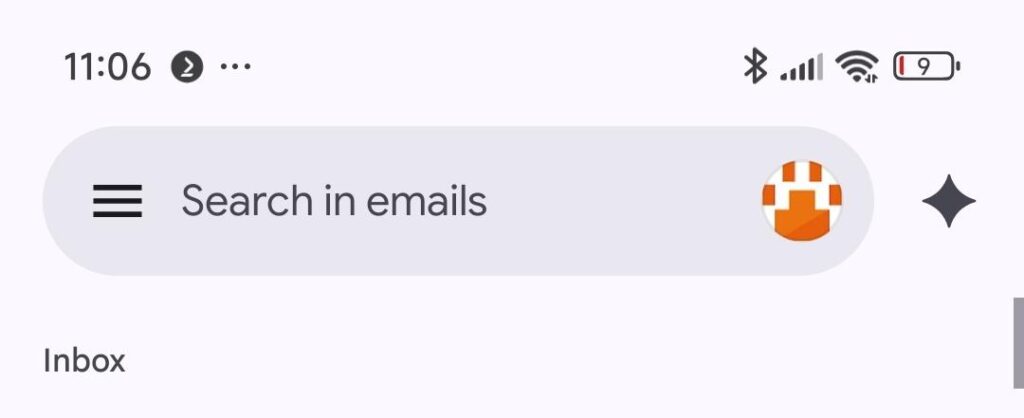
how to remove the AI prompt from Gmail? I found the setting for SMS/Messages but I can’t find the switch for gmail.. and when you swipe up to go through your accounts.. all of a sudden the button shifts to the left and you hit the AI button again. FFS Google.. what’s wrong with you???
yes.. I will charge my phone~
dynamic power and solar panels

using a flexible energy tariff is potentially a disaster waiting to happen, expecially remembering the gas prices during the COVID and the Ukraine crisis of lately.

But if you are smart and willing to invest in sustainability, it can really pay off.

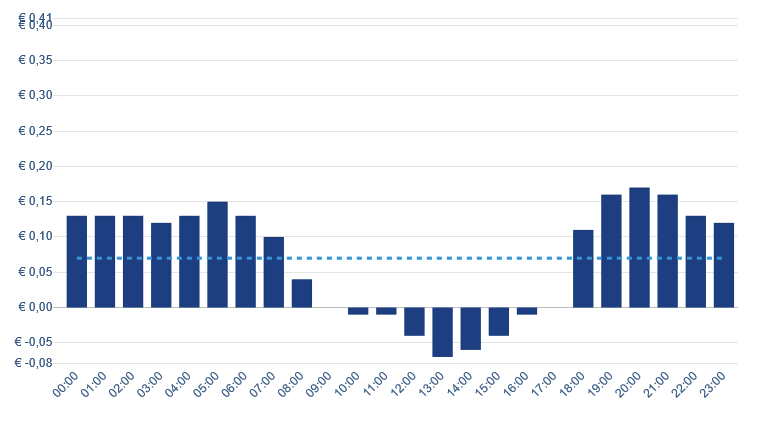
In the Netherlands there is a large amount of photovoltaic and wind power available.. so when the wind blows and the sun is shining.. the grid has too much power and you are getting free.. sometimes even negative energy prices (they want you to get rid of the excess power and reward you for that.) It looks like this:

the prices follow the sun. Nice. If you have a programmable dishwasher, washing machine and you can do certain things (like cooking) during those hours.. your energy is basically free.*

(*it is not free. because you still pay transport and tax on it… but the commercial price is negative so it evens out)

at 15:00 hours I switched on the airconditioning as my appartment had heated up to 30 degrees. Working from home became difficult. Consumed 8,5kWh and paid 75 cents for that. NICE. (highest amount is tax and transport.. the power itself was mostly free) – usually this amount of power would have cost me about 3 euros

but we can do better. putting solar panels on the balcony that produce power in the afternoon and buffering 2.4kW in a battery that can be programmed to buffer and distribute power according to a scheme.. we should be able to get even better.

Also.. that flatline is my baseline.. my NAS, the internet router and the standby of all my not-so-smart devices. How about I use the solar energy to cover that?

the challenge is: using solar panels when everyone else is using them does not give me any benefit.. the energy is virtually free when the sun is shining.. so I should use most of it myself! Even more… injecting it back into the grid (as is the default when you have excess energy) will be penalized.. negative energy tariff means they charge you when you inject power. Let’s not do that.

balcony power – 2 x 500Wp panels and a microinverter

in the winter I successcully used those panels to heat my appartment instead of the conventional stove. the reduction in cost for gas was actually about 800 euros / year. Energy will not be as efficient.. so those panels will never “pay back for themselves” as the Dutch love to calculate.

Also I am using more power in exchange for gas.. I am just lowering the operational cost. The investment never pays off..

5 years of gas and energy consumption with trendlines

it gets better, when you add money to the graphs: this is the price per m3 of gas in the Netherlands for the consumer. This is just scary. (also: Fuck you, Vladi!)

so my heating cost went from 120 a month in winter to 400 a month.. and it got worse for some people with dynamic tarrifs.. so I went and installed a heatpump. More power. less Gas.

Plus: we need a battery. We want to save the energy when the sun is shining and the power is virtually free.

I wanted to get an Anker Solix but it was “only” 1,6kWh.. and the Zendure “all in one” offered 2400Wh. Also..it was supposed to be “bring your own microinverter” and not “use Anker’s inverter or miss out on half of the features”

https://zendure.de/products/aio-2400

pretty smart design, the microinverter has a dedicated space on the top / rear and the rest is self-explaining. Connect solar to battery, connect battery to inverter.

plus: LED color is adjustable. an IMPORTANT feature of current products xD

now this is connected, let’s set up our system. I want to charge the battery as much as possible in the afternoon, then output about 200 watts constantly to cover my baseline.

my calculations suggested that 2400Wh would be just not enough for a whole day.. but I came close. This is the setup when the battery is being charged

once it is full, it disconnects the battery and sends all the power to the grid – and because I dont want to give it away, this is the moment when I switch on my air conditioner or the playstation. because.. free energy. let’s use it :)

and to make it even sweeter.. as the power is most expensive in the evening hours, you can have the system monitor a group in your power distribution or a smart plug in your house.. that way I can have the battery give away more energy when I consume more in the evening.

the setup with playstation and TV on.
my energy price.. between 18 and 22h I want the battery to inject most into my home. Otherwise just serve the baseline.

this all works surprisingly well.. my energy consumption is basically down 20% compared to last month (including using the airco for cooling)

this will probably look not so good in winter, when I need to heat again.. but when the sun is shining I can heat my home with the airconditioner. which should save energy, too.

result:

800 euros less energy cost per year (mostly because of the heatpump) and 20% less “wasted” energy because I use it myself vs. injecting into the public grid.

this is the setup working as intended: the day before was sunny, it charged the battery.. from 2000 on it started discharging and almost got rid of the “baseline” for the next day till the morning. (orange is what my energy broker “expected’ for me… sorry!)

the baseline is almost gone

and when I use the playstation in the evening, the battery takes care of that, but then there is not enough reserve for the night and the next morning.

I want to build this even bigger in my next house.. so I can run the heatpump all day from the battery.. about 24kWh needed for that. that’s a pile or batteries :)

and I read that you can even charge them from the grid if you want. so.. charge the batteries for the house together with your car when it’s cheap. Big project coming up

DNS based parental controls (ghetto way)

so parental controls are needed for some people.. or frankly.. sometimes you just can’t hide from all this porn and stuff that you rather would prefer not to have seen afterwards. However only Apple has a properly working solution, and that’s user based, anyway… so how to do this for windows, apple, linux, mobile phones, TVs, etc etc etc.. in a home?

For the android mobiles I have family link, Apple devices have solid parental controls but Windows/Linux is either expensive or.. well. do it yourself :)

I decided to do three things: 1) change DNS resolver on the home router and 2) manipulate the laptops using CNAMEs to force them to enable safe search (as you can still see smut when using google/bing/youtube and disabling safe search). Step 3 was rolling out Google Family Link on the mobile devices.

Step 1: DNS resolver.

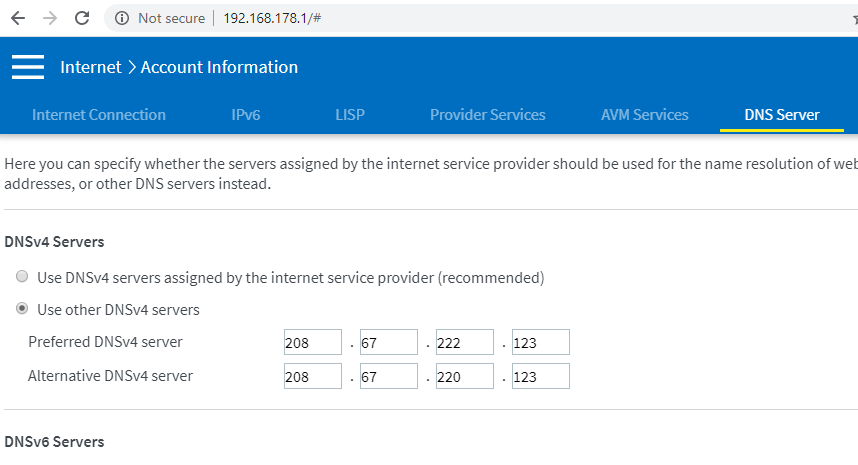
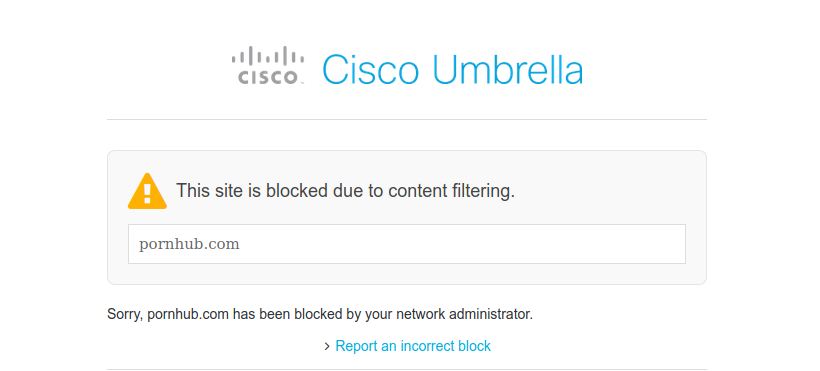
Easy. Go to openDNS and search for “family shield” – their DNS resolvers have not only security filtering but also parental controls enabled.

Put those into your router instead of the ones provided by your ISP. That works well. I have not found a way to do this with IPv6, though.. the open DNS resolvers for IPv6 do work but I could not find them for family shield, help?

router settings
finished result

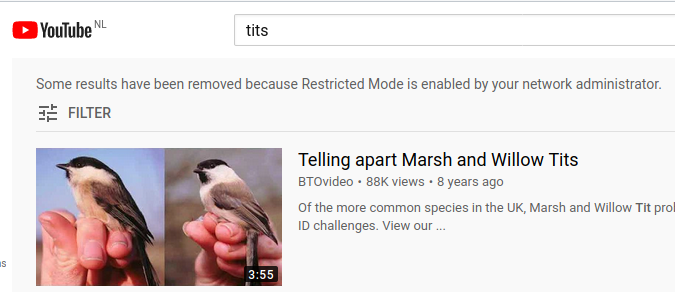
Step 2: Google image search still finds smut.

Let’s adjust that, too ;)

https://support.google.com/websearch/answer/186669?hl=en

same for bing: CNAMEs for google/bing/youtube. I was not aware this exists but you can force the safe search setting by pointing www.google.com (and every other country needed/used) to the IP of forcesafesearch.google.com in your hosts file (or DNS server / DHCP relay) – in my case: just /etc/hosts

the same goes for strict.bing.com, youtube, yahoo, duckduckgo and youtube.com – just create CNAMEs / hosts entries as indicated here based on where geolocation/anycast sends you to.

so from this:

#ping strict.bing.com
 Pinging a-0017.a-msedge.net [204.79.197.220]

#ping restrict.youtube.com
 Pinging restrict.youtube.com [216.239.38.120]

(alternative: restrictmoderate.youtube.com - have not tested this)

#ping forcesafesearch.google.com
 Pinging forcesafesearch.google.com [216.239.38.120]

#ping safe.duckduckgo.com
 Pinging safe.duckduckgo.com [52.142.126.100]

you create this:


216.239.38.120 www.google.com #forcesafesearch
216.239.38.120 google.com
216.239.38.120 google.de
216.239.38.120 www.google.de
216.239.38.120 google.nl
216.239.38.120 www.google.nl

216.239.38.120 www.youtube.com #restrict.youtube.com
216.239.38.120 youtube.com
216.239.38.120 www.youtube.de
216.239.38.120 youtube.de
216.239.38.120 www.youtube.nl
216.239.38.120 youtube.nl

216.239.38.120 youtube.googleapis.com #restrict.youtube.com
216.239.38.120 youtubei.googleapis.com
216.239.38.120 www.youtube-nocookie.com
216.239.38.120 youtube.googleapis.de
216.239.38.120 youtubei.googleapis.de
216.239.38.120 www.youtube-nocookie.de
216.239.38.120 youtube.googleapis.nl
216.239.38.120 youtubei.googleapis.nl
216.239.38.120 www.youtube-nocookie.nl

204.79.197.220 www.bing.com #strict.bing.com
204.79.197.220 bing.com 
204.79.197.220 www.bing.de
204.79.197.220 bing.de
204.79.197.220 www.bing.nl
204.79.197.220 bing.nl

216.239.38.120 yahoo.com #redirect to safe google
216.239.38.120 www.yahoo.com
216.239.38.120 yahoo.de
216.239.38.120 www.yahoo.de
216.239.38.120 yahoo.nl
216.239.38.120 www.yahoo.nl

52.142.126.100 duckduckgo.com #safe.duckduckgo.com
52.142.126.100 www.duckduckgo.com
52.142.126.100 duckduckgo.de
52.142.126.100 www.duckduckgo.de
52.142.126.100 duckduckgo.nl
52.142.126.100 www.duckduckgo.nl

(YAHOO DOESN’T OFFER THIS SERVICE SO WE JUST REDIRECT TO GOOGLE. THEIR FAULT)

the internet just got a lot more funny :)

Step 3: Mobile Phones/Tablets

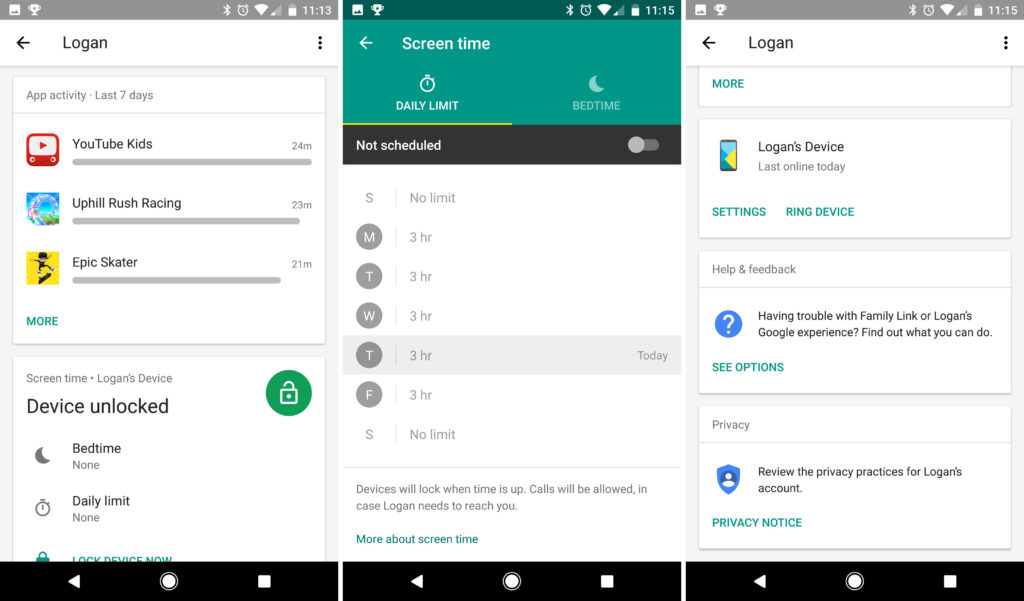
Kids are smart. they will find out that using 4G they bypass the filters that we just created. So I can only recommend Apple’s parental controls, they are solid and can be fine-tuned but they are per-device. Google has a different framework called Family Link.

It takes control over the phone, allows you to set limits for use, bedtime, app installs, filters for browsing, force safe search, etc..etc. – also works well for Apple. It also forces you (the parent) to link to the family as “Admin” so you will be asked questions for app installs, can approve and reject, keep track how much time was spent on what app, set limits per app, etc.

Step X: moving on

Please. for the love of god: Take a moment and explain to your kids why you do this. Make them understand that there are people out there without good intentions. That you are protecting them for their own good and that these restrictions will be dropped when they turn 13/16/18 years old – make a plan and PLEASE tell them that you are able to track that phone. Be transparent and they will be, too when they grow up. Also: they will trust you. If you disagree with me please watch the “Black Mirror” episode “Arkangel”

sources:

  • https://www.leowkahman.com/2017/09/11/enforce-safe-search-on-google-youtube-bing/
  • https://support.opendns.com/hc/en-us/articles/227986807-How-to-Enforcing-Google-SafeSearch-YouTube-and-Bing

Fedora 31 on Dell 5591

So in this trying times (thanks, Corona) I got myself a new employer and a new laptop. A Dell 5591 (a.k.a. heavy boi) but as I saw it has a dedicated GPU and lots of RAM next to a second SSD.. I decided it has to dual boot Fedora and Windows. Here my notes/caveats.

  1. Have your bitlocker recovery key ready, Fedora plays with the partitions which locks your drive. You need to unlock it only once after the disk has been manipulated but you have to. (or your admin.. or you need a new windows install!)
  2. disable UEFI Fast/Secure boot in BIOS if you want to run proprietary Nvidia card drivers. (that laptop has a hybrid Intel dedicated / MX130 GPU (optimus?)
  3. nvidia proprietary driver as described by negativo17 is a lot more stable/predictable than the stuff described at Fedora Optimus or

The installer of the live image is as sweet as ever. Everything works right out of the box, no surprises. No trouble. <3
Automatic partitioning actually does a really good job (I shrank the windows/bitlocker volume a bit so i can install next to Windows, just to prove a point – the installer found this and put itself next to it nicely. (see note about bitlocker above)

  • once started the usual things to do are:
  • RPMfusion (free, nonfree, steam, nvidia) – choose :)
  • subpixel font hinting (slight)
  • change scale to 0.9 or 0.95 using gnome-tweak-tool
  • decide screen lock / sleep / suspend / lid close (this seems to change with every fedora release)

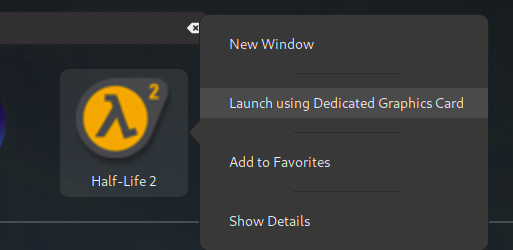
About this nvidia/intel hybrid thing… there seems to be a lot of things going on wrt prime/optimus/render offloading.. as I am using Negativo17‘s driver implementation the Gnome feature does not quite work, yet.. at least I have not seen the card work for applications launched that way. There is a lot of information on https://negativo17.org/nvidia-driver/ and it is still a lot less work and actually works compared to the manual kernel module hacking and playing with runlevels as indicated at the RPMfusion website ;)

here is hope…

using the flag
__NV_PRIME_RENDER_OFFLOAD=1 __GLX_VENDOR_LIBRARY_NAME=nvidia [appname]
to start an application actually works!

the website hints to edit the steam launch options adding “DRI_PRIME=1 %command%” but for me it is the NV_PRIME_RENDER… string that does the magic. Needs more testing with 32 bit libs.

[andreas@NB-AR ~]$ __NV_PRIME_RENDER_OFFLOAD=1 __GLX_VENDOR_LIBRARY_NAME=nvidia glxspheres64 
Polygons in scene: 62464 (61 spheres * 1024 polys/spheres)
Visual ID of window: 0x2c8
Context is Direct
OpenGL Renderer: GeForce MX130/PCIe/SSE2
61.419987 frames/sec - 68.544706 Mpixels/sec
60.036362 frames/sec - 67.000580 Mpixels/sec

but I haven’t gotten it to work for steam, yet. may be caused by 32 bits and that we are actually running ubuntu stuff here. :)

[andreas@NB-AR ~]$ __NV_PRIME_RENDER_OFFLOAD=1 __GLX_VENDOR_LIBRARY_NAME=nvidia steam 
Running Steam on fedora 31 64-bit
STEAM_RUNTIME is enabled automatically
Pins up-to-date!
/home/andreas/.local/share/Steam/ubuntu12_32/steam

guess I have to amend this string to the .desktop files for the application ( ~/.local/share/applications) or whereever this is set up

I did encounter some suspend issues (device freezing/black screen after resume) so I did follow this article and enabled the traces.. then changed the RTC from CEST to UTC (as recommended) – so far no problems anymore. (but they also hint to the nvidia driver…)

# timedatectl 
               Local time: Sun 2020-03-29 16:09:13 CEST
           Universal time: Sun 2020-03-29 14:09:13 UTC
                 RTC time: Sun 2020-03-29 16:09:13
                Time zone: Europe/Amsterdam (CEST, +0200)
System clock synchronized: yes
              NTP service: active
          RTC in local TZ: yes

Warning: The system is configured to read the RTC time in the local time zone. This mode cannot be fully supported. It will create various problems with time zone changes and daylight saving time adjustments. The RTC time is never updated, it relies on external facilities to maintain it.
If at all possible, use RTC in UTC by calling 'timedatectl set-local-rtc 0'.

# timedatectl set-local-rtc 0
# timedatectl 
               Local time: Sun 2020-03-29 16:09:47 CEST
           Universal time: Sun 2020-03-29 14:09:47 UTC
                 RTC time: Sun 2020-03-29 14:09:47
                Time zone: Europe/Amsterdam (CEST, +0200)
System clock synchronized: yes
              NTP service: active
          RTC in local TZ: no


# echo 1 > /sys/power/pm_trace
# systemctl suspend

new server build log (18.04 LTS)

decided to refresh my poor server that had failing disks and bring it to the next level.
– Ubuntu 18.04 LTS on an SSD as a base. (steam and plex still seem to love ubuntu)
– install SSHD and start from scratch.
– differnet harddisks instead of LVM
– replace my AMD FX with a Ryzen 5
– add a GTX1060 for video transcoding and steam
– enable steam link
– throw nextcloud on it
– different mountpoints/drives for nextcloud and plex
– an SSD for system/root
– two factor authentication
– and…of course.. it has to run minecraft server ^^

computing power is x4 now while power consumption has halved, I will probably throw some hypervisor and another SSD for that on it, too. I want to play with pfsense and SDN some more and always need a public host (next to my VPS)

NVENC 2 stream limit

It seems some kind soul on the internet found a way to remove the 2 NVENC stream limit from the non-tesla (quadro) cards

tested and approved ^^

https://github.com/keylase/nvidia-patch

before:

+-----------------------------------------------------------------------------+
| NVIDIA-SMI 440.44 Driver Version: 440.44 CUDA Version: 10.2 |
|-------------------------------+----------------------+----------------------+
| GPU Name Persistence-M| Bus-Id Disp.A | Volatile Uncorr. ECC |
| Fan Temp Perf Pwr:Usage/Cap| Memory-Usage | GPU-Util Compute M. |
|===============================+======================+======================|
| 0 GeForce GTX 106... Off | 00000000:1F:00.0 Off | N/A |
| 41% 46C P2 35W / 120W | 921MiB / 3016MiB | 0% Default |
+-------------------------------+----------------------+----------------------+

+-----------------------------------------------------------------------------+
| Processes: GPU Memory |
| GPU PID Type Process name Usage |
|=============================================================================|
| 0 1442 C /usr/lib/plexmediaserver/Plex Transcoder 331MiB |
| 0 1644 C /usr/lib/plexmediaserver/Plex Transcoder 517MiB |
| 0 1964 G /usr/lib/xorg/Xorg 59MiB |
+-----------------------------------------------------------------------------+

after:

Wed Jan 15 21:16:14 2020
+-----------------------------------------------------------------------------+
| NVIDIA-SMI 440.44 Driver Version: 440.44 CUDA Version: 10.2 |
|-------------------------------+----------------------+----------------------+
| GPU Name Persistence-M| Bus-Id Disp.A | Volatile Uncorr. ECC |
| Fan Temp Perf Pwr:Usage/Cap| Memory-Usage | GPU-Util Compute M. |
|===============================+======================+======================|
| 0 GeForce GTX 106... Off | 00000000:1F:00.0 Off | N/A |
| 41% 48C P2 41W / 120W | 1429MiB / 3016MiB | 19% Default |
+-------------------------------+----------------------+----------------------+

+-----------------------------------------------------------------------------+
| Processes: GPU Memory |
| GPU PID Type Process name Usage |
|=============================================================================|
| 0 1442 C /usr/lib/plexmediaserver/Plex Transcoder 331MiB |
| 0 1644 C /usr/lib/plexmediaserver/Plex Transcoder 517MiB |
| 0 1964 G /usr/lib/xorg/Xorg 59MiB |
| 0 2617 C /usr/lib/plexmediaserver/Plex Transcoder 357MiB |
| 0 2684 C /usr/lib/plexmediaserver/Plex Transcoder 149MiB +-----------------------------------------------------------------------------+

running 5 simultaneous 1080p transcodes on a GTX1060 now (if I want it to…total overkill as usual but hey… ;)

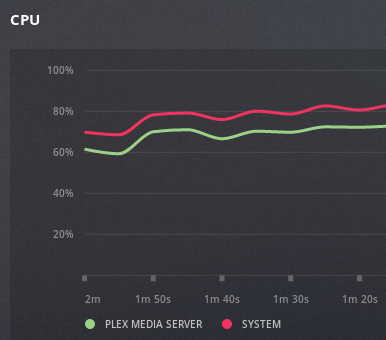
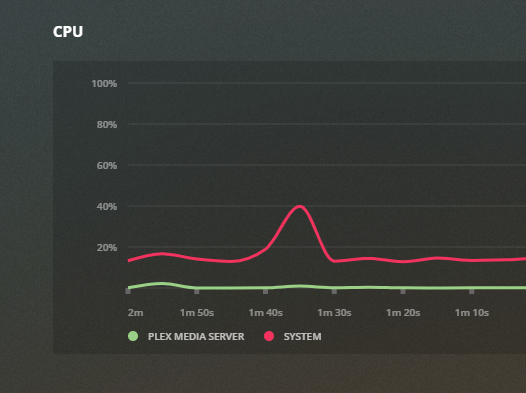
using CPU transcoder for HEVC source material
using NVENC – I can use the CPU for other tasks

details:

find out what directory nvidia is installed (CACHEDEV2 for me) and add the lib directory to the dynamic linker ld.so.conf

[admin@xxxxlib]# export TERM=xterm-256color
[admin@xxxxlib]# vim /etc/ld.so.conf

add at the bottom:
/share/CACHEDEV2_DATA/.qpkg/NVIDIA_GPU_DRV/usr/lib

then run ldconfig
[admin@xxxxlib]# ldconfig

thanks, https://blog.slowb.ro/fix-terminal-capability-cm-required/

now nvidia-smi should work:

[admin@NAS65211F bin]# ./nvidia-smi
Sat Dec 2 10:11:46 2023
+-----------------------------------------------------------------------------+
| NVIDIA-SMI 515.48.07 Driver Version: 515.48.07 CUDA Version: 11.7 |
|-------------------------------+----------------------+----------------------+
| GPU Name Persistence-M| Bus-Id Disp.A | Volatile Uncorr. ECC |
| Fan Temp Perf Pwr:Usage/Cap| Memory-Usage | GPU-Util Compute M. |
| | | MIG M. |
|===============================+======================+======================|
| 0 NVIDIA GeForce … Off | 00000000:01:00.0 Off | N/A |
| 40% 29C P8 N/A / 75W | 4MiB / 4096MiB | 0% Default |
| | | N/A |
+-------------------------------+----------------------+----------------------+

+—————————————————————————–+
| Processes: |
| GPU GI CI PID Type Process name GPU Memory |
| ID ID Usage |
|=============================================================================|
| No running processes found |
+—————————————————————————–+
[admin@NAS65211F bin]#

check the driver version, download and install the patch:

https://github.com/keylase/nvidia-patch

for some reason the automatic patching does not work anymore so its manual now.
https://emby.media/community/index.php?/topic/102522-tips-to-get-the-most-out-of-your-nvidia-gpu/

not in the mood right now. fuck nvidia

blocking youtube, insta and facebook once and for all

I have been busy for a while figuring out just how much freedom and control I need to use to keep my children from harm from the online world.. after all I know how much trolling is going on and how much hate is being generated/amplified there.
At the same time I am still that blind optimist that believes as long as people talk to each other eventually the good guys will pravail and win because they work together.
Now, with facebook and google using smart algorithms mining big data that they generate from millions of hosts and applying that with addiction-generating systems that generate revenue.. I must admit that is a) very smart, b) a dick move and by all means c) unacceptable if it happens on the back of innocent, uncorrupted and ignorant beings (namely my children)

so I have been using google family link to control the devices of my kids for a while now.
I don’t care what websites they use and who they chat with, they need to learn that some people don’t want to be your friend themselves.
But I have created a blacklist that contains three words:
– youtube
– instagram
– facebook

these three started out wonderful and creative and are now what McDonalds feels like. Fat, lethargic and only interested in making more money. In my eyes they don’t exist anymore but I realize how much the peers of my children are pushing them back and always back again into these platforms.
Everyone who knows a bit about data mining will understand that even without a facebook account, the fact that 5 of your friends have one and they have your number in their address book, that facebook app has access to that address book (to help you “find your friends faster”) and that they get location and demographic information about you by banner ads and tracking cookies that are sent to your device will pretty much tell them all about you without you having an account. It is highly efficient and super scary.

So… while I can more or less control the mobile devices I can not do this for the PC at home.
Also I was looking for a time keeper to control how many hours they are busy.
(Again.. I don’t care if it’s music videos, reddit or minecraft.. but there has to be a balance)

Also laptops can be carried to the neighbors, so installing a pi-hole or DNS blocklists won’t work once they are at the neighbors, whos mother things I am paranoid (I am!) so.. another solution was needed. > see below

Continue reading

automated Plex backup 2019 style

2019 – ubuntu is now using systemd (18.04LTS), my home server is running a ryzen processor, CIFS is almost as fast as NFS now and the automated rsync jobs have stopped.
Time to re-build them!
Note: This is a closed system, I am not taking care of security here much as my network is considered “secure” – this is probably not going to win many security awards

Step 1: Networking

Ubuntu 18.04 uses systemd and netplan so no more hacking around /etc/network/interfaces. The config is in /etc/netplan – the default file is 50-cloud-init.yaml

network:
version: 2
ethernets:
enp2s0:
dhcp4: false
addresses:
- 10.0.0.2/24
mtu: 9000

and apply the settings with sudo netplan apply
and verify withip addr
ST,UP,LOWER_UP> mtu 1500 qdisc fq_codel state UP
however, this did not bring the mtu to 9000 so we need another thing:
> sudo ip link set mtu 9000 enp2s0
and from what I hear this may not be transitory / survive reboots.. in that case it needs to go into the startup scripts.
Anyway: that’s what I wanted:
enp2s0: MULTICAST,UP,LOWER_UP> mtu 9000 qdisc fq_codel state UP

Step 2: Mount the NAS

verify shares are working (NFS and CIFS)

andreas@plexcloud:/$ showmount -e 10.0.0.1
Export list for 10.0.0.1:
/shares/public *
/shares/andreas *
andreas@plexcloud:/$ smbclient -L //10.0.0.1 -U andreas
WARNING: The "syslog" option is deprecated
Enter WORKGROUP\andreas's password:
Sharename       Type      Comment
---------       ----      -------
public          Disk      public
andreas         Disk      Andreas sein Zeug

try to mount is manually: (as root because I will mount using fstab later)

root@plexcloud:~# mount -t cifs -o username=andreas,password=xxxxxxxxxxxx,iocharset=utf8,file_mode=0777,dir_mode=0777,soft,user,noperm,vers=1.0 //10.0.0.1/public /mnt/NAS/

root@plexcloud:~# ls /mnt/NAS
[data]

actually. it’s 2019.. I changed my mind wrt fstab.. let’s use automount (As I never know if my NAS will be up or not while I move to my new place)
https://help.ubuntu.com/community/Autofs <<< that’s supposed to be easy?

apt install autofs
edit /etc/auto.master and add the line
/mnt /etc/auto.smb
(which should tell autofs to look at /etc/auto.smb and perform its magic in /mnt) – basically mounting SMB shares in the /mnt directory. CIFS would be a better way.. which doesn’t work for me.. so it’s the manual mode for me for now

for the lazy me: edit fstab and add:
//10.0.0.1/public /mnt/NAS/ cifs username=YOURUSERNAME,password=YOURPASSWORD,iocharset=utf8,file_mode=0777,dir_mode=0777,soft,user,noperm,vers=1.0
vers=1.0 is to bypass the “host is down” error (assuming proper authentication should be used) and the rest is to bypass said authentication and not to fuck around with file permissions (just behave like a fucking USB stick, damn it.. no one else is using you!)
yeah, I know.. “guest” would probably work, too.. but I had bad experiences with permissions afterwards.

so now I have a mountpoint, let’s do backups!

Step 3: test and automate rsync jobs

motivation: rsync with delete – whatever I delete from the source can be deleted on the backup, too
full sync for the server directory, only check by size for the media files
I like -v and “–progress” as it gives me an indication what is going on (on the first run…)
however not in the scripts, a simple –stats will have to do, there…

so for the server backup:
rsync -ahv /var/lib/plexmediaserver/ /mnt/NAS/backups/plexmediaserver/ --progress --delete --stats --dry-run
non-verbose and “live” mode:
rsync -a /var/lib/plexmediaserver/ /mnt/nas/backups/plexmediaserver/ –delete

(I removed the -z because the data dir is 7 GB and the compression too too long on that stupid atom-based nas)

and for files:
rsync -ahv /plex/ /mnt/NAS/plex/ --progress --size-only --delete --stats --dry-run
and non-verbose:
rsync -aq /plex/ /mnt/NAS/plex/ --size-only --delete

first version of the script used copy but this took AGES to finish so rsync all the way now. After all it seems my old seagate NAS does rsync :D

the /var/lib/plexmediaserver dir still takes way too long.. so I will tar and zip it and rsync it over instead – much faster – also –delete-source-files is handy (as mv can not overwrite and I don’t feel good calling rm -rf in a script executed by root….)

tar -zcvf plexmediaserver.tar.gz /var/lib/plexmediaserver/

finished script: added to crontab

0 4 * * * cd /home/andreas && sh backup_plex.sh>>plex_backup.log

#!/bin/bash
echo "+++stopping plex media server"
systemctl stop plexmediaserver.service
sleep 5
echo "+++backing up server and cache"
#rsync -ahz /var/lib/plexmediaserver/ /mnt/NAS/backups/plexmediaserver/ --stats --delete
tar -zcf /opt/plex/plexmediaserver.tar.gz /var/lib/plexmediaserver/
echo "+++copying tarball over to NAS"
#rsync -ahv /opt/plex/ /mnt/NAS/backups/plex/ --remove-source-files --progress --stats
rsync -ah /opt/plex/ /mnt/NAS/backups/plex/ --remove-source-files
echo "+++restarting plex media server"
systemctl start plexmediaserver.service
echo "+++server backup complete - now for the files"
#rsync -ahv /plex/ /mnt/NAS/plex/ --progress --size-only --delete --stats
rsync -ah /plex/ /mnt/NAS/plex/ --size-only --delete