
don’t be that guy. Linkedin is about creating opportunities.

don’t be that guy. Linkedin is about creating opportunities.
If you are one of the lucky ones that have a laptop with a combined Intel/Nvidia GPU (also called “cross-processor” or “video co-processor” or “prime” – it features an nvidia mx or quadro chip that “helps” the intel integrated chipset. One thing to be aware of, this is not a discrete GPU – you can _not_ disable either of them permanently or use only one (to save battery at work / have more graphics power for steam, etc…) they always work together. But that aside. using a recent nvidia driver it works fine and even in Ubuntu this is now an option (when using the proprietary driver)
This works fine in most of the cases, see task manager: GPU0 indicates it is using the nvidia GPU

you can tune these settings using the nvidia control panel per application

However, a simple web-app called SketchUp (the free version is no longer for download) I found out it looks ugly.. like.. “2004 videogame” ugly.


Note: the following does not work for Firefox and Edge browser (no idea why) but works very well in Chrome and Safari.
In the NVIDIA Control Panel under “3D Settings” select “Adjust image settings with preview” and chose “Use the advanced 3D image settings” – this allows the applications to configure their prefered GPU

then, select Chrome and associate it with the Nvidia GPU (and tweak the settings if you feel adventurous) and restart chrome (also terminate the chrome agent in the taskbar (or just reboot))

there.. much better. Enjoy 3D graphics the way they were meant to look like.

keep in mind, a MX130 is not a powerful video card, the results are.. well.. don’t expect 2020 gaming graphics but still looks very nice and smooth.

as a part of Unicode 13 we will soon have the universal emoji for “network engineer” – among many others (see: emojipedia)


but my personal favorite is this one:

so parental controls are needed for some people.. or frankly.. sometimes you just can’t hide from all this porn and stuff that you rather would prefer not to have seen afterwards. However only Apple has a properly working solution, and that’s user based, anyway… so how to do this for windows, apple, linux, mobile phones, TVs, etc etc etc.. in a home?
For the android mobiles I have family link, Apple devices have solid parental controls but Windows/Linux is either expensive or.. well. do it yourself :)
I decided to do three things: 1) change DNS resolver on the home router and 2) manipulate the laptops using CNAMEs to force them to enable safe search (as you can still see smut when using google/bing/youtube and disabling safe search). Step 3 was rolling out Google Family Link on the mobile devices.
Easy. Go to openDNS and search for “family shield” – their DNS resolvers have not only security filtering but also parental controls enabled.
Put those into your router instead of the ones provided by your ISP. That works well. I have not found a way to do this with IPv6, though.. the open DNS resolvers for IPv6 do work but I could not find them for family shield, help?
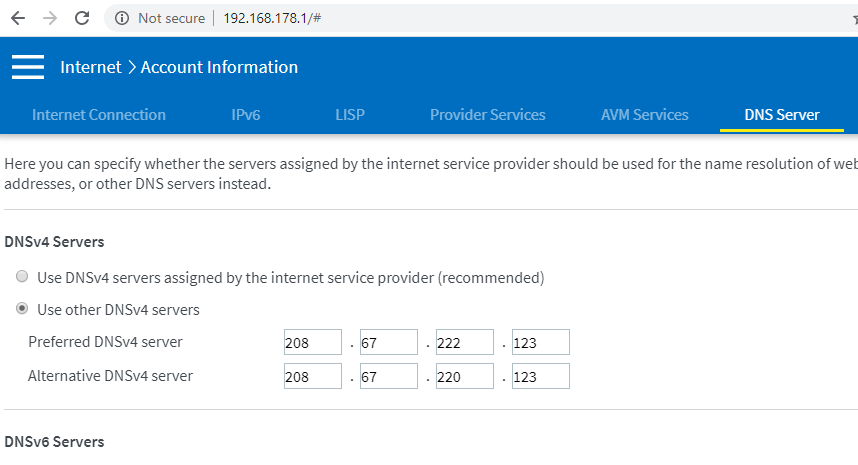

Let’s adjust that, too ;)
https://support.google.com/websearch/answer/186669?hl=en
same for bing: CNAMEs for google/bing/youtube. I was not aware this exists but you can force the safe search setting by pointing www.google.com (and every other country needed/used) to the IP of forcesafesearch.google.com in your hosts file (or DNS server / DHCP relay) – in my case: just /etc/hosts
the same goes for strict.bing.com, youtube, yahoo, duckduckgo and youtube.com – just create CNAMEs / hosts entries as indicated here based on where geolocation/anycast sends you to.
#ping strict.bing.com
 Pinging a-0017.a-msedge.net [204.79.197.220]

#ping restrict.youtube.com
 Pinging restrict.youtube.com [216.239.38.120]

(alternative: restrictmoderate.youtube.com - have not tested this)

#ping forcesafesearch.google.com
 Pinging forcesafesearch.google.com [216.239.38.120]

#ping safe.duckduckgo.com
 Pinging safe.duckduckgo.com [52.142.126.100]
216.239.38.120 www.google.com #forcesafesearch
216.239.38.120 google.com
216.239.38.120 google.de
216.239.38.120 www.google.de
216.239.38.120 google.nl
216.239.38.120 www.google.nl

216.239.38.120 www.youtube.com #restrict.youtube.com
216.239.38.120 youtube.com
216.239.38.120 www.youtube.de
216.239.38.120 youtube.de
216.239.38.120 www.youtube.nl
216.239.38.120 youtube.nl

216.239.38.120 youtube.googleapis.com #restrict.youtube.com
216.239.38.120 youtubei.googleapis.com
216.239.38.120 www.youtube-nocookie.com
216.239.38.120 youtube.googleapis.de
216.239.38.120 youtubei.googleapis.de
216.239.38.120 www.youtube-nocookie.de
216.239.38.120 youtube.googleapis.nl
216.239.38.120 youtubei.googleapis.nl
216.239.38.120 www.youtube-nocookie.nl

204.79.197.220 www.bing.com #strict.bing.com
204.79.197.220 bing.com
204.79.197.220 www.bing.de
204.79.197.220 bing.de
204.79.197.220 www.bing.nl
204.79.197.220 bing.nl

216.239.38.120 yahoo.com #redirect to safe google
216.239.38.120 www.yahoo.com
216.239.38.120 yahoo.de
216.239.38.120 www.yahoo.de
216.239.38.120 yahoo.nl
216.239.38.120 www.yahoo.nl

52.142.126.100 duckduckgo.com #safe.duckduckgo.com
52.142.126.100 www.duckduckgo.com
52.142.126.100 duckduckgo.de
52.142.126.100 www.duckduckgo.de
52.142.126.100 duckduckgo.nl
52.142.126.100 www.duckduckgo.nl
(YAHOO DOESN’T OFFER THIS SERVICE SO WE JUST REDIRECT TO GOOGLE. THEIR FAULT)
the internet just got a lot more funny :)



Kids are smart. they will find out that using 4G they bypass the filters that we just created. So I can only recommend Apple’s parental controls, they are solid and can be fine-tuned but they are per-device. Google has a different framework called Family Link.
It takes control over the phone, allows you to set limits for use, bedtime, app installs, filters for browsing, force safe search, etc..etc. – also works well for Apple. It also forces you (the parent) to link to the family as “Admin” so you will be asked questions for app installs, can approve and reject, keep track how much time was spent on what app, set limits per app, etc.
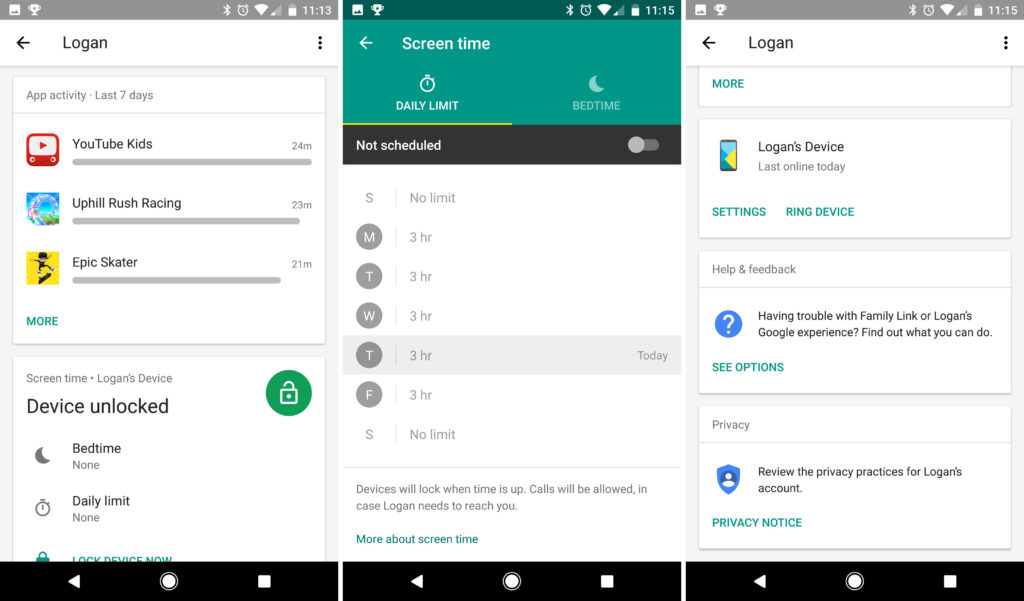
Please. for the love of god: Take a moment and explain to your kids why you do this. Make them understand that there are people out there without good intentions. That you are protecting them for their own good and that these restrictions will be dropped when they turn 13/16/18 years old – make a plan and PLEASE tell them that you are able to track that phone. Be transparent and they will be, too when they grow up. Also: they will trust you. If you disagree with me please watch the “Black Mirror” episode “Arkangel”
sources:
So in this trying times (thanks, Corona) I got myself a new employer and a new laptop. A Dell 5591 (a.k.a. heavy boi) but as I saw it has a dedicated GPU and lots of RAM next to a second SSD.. I decided it has to dual boot Fedora and Windows. Here my notes/caveats.
The installer of the live image is as sweet as ever. Everything works right out of the box, no surprises. No trouble. <3
Automatic partitioning actually does a really good job (I shrank the windows/bitlocker volume a bit so i can install next to Windows, just to prove a point – the installer found this and put itself next to it nicely. (see note about bitlocker above)
About this nvidia/intel hybrid thing… there seems to be a lot of things going on wrt prime/optimus/render offloading.. as I am using Negativo17‘s driver implementation the Gnome feature does not quite work, yet.. at least I have not seen the card work for applications launched that way. There is a lot of information on https://negativo17.org/nvidia-driver/ and it is still a lot less work and actually works compared to the manual kernel module hacking and playing with runlevels as indicated at the RPMfusion website ;)
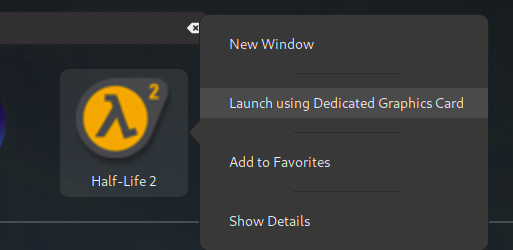
using the flag
__NV_PRIME_RENDER_OFFLOAD=1 __GLX_VENDOR_LIBRARY_NAME=nvidia [appname]
to start an application actually works!
the website hints to edit the steam launch options adding “DRI_PRIME=1 %command%” but for me it is the NV_PRIME_RENDER… string that does the magic. Needs more testing with 32 bit libs.
[andreas@NB-AR ~]$ __NV_PRIME_RENDER_OFFLOAD=1 __GLX_VENDOR_LIBRARY_NAME=nvidia glxspheres64
Polygons in scene: 62464 (61 spheres * 1024 polys/spheres)
Visual ID of window: 0x2c8
Context is Direct
OpenGL Renderer: GeForce MX130/PCIe/SSE2
61.419987 frames/sec - 68.544706 Mpixels/sec
60.036362 frames/sec - 67.000580 Mpixels/sec
but I haven’t gotten it to work for steam, yet. may be caused by 32 bits and that we are actually running ubuntu stuff here. :)
[andreas@NB-AR ~]$ __NV_PRIME_RENDER_OFFLOAD=1 __GLX_VENDOR_LIBRARY_NAME=nvidia steam
Running Steam on fedora 31 64-bit
STEAM_RUNTIME is enabled automatically
Pins up-to-date!
/home/andreas/.local/share/Steam/ubuntu12_32/steam
guess I have to amend this string to the .desktop files for the application ( ~/.local/share/applications) or whereever this is set up
I did encounter some suspend issues (device freezing/black screen after resume) so I did follow this article and enabled the traces.. then changed the RTC from CEST to UTC (as recommended) – so far no problems anymore. (but they also hint to the nvidia driver…)
# timedatectl
               Local time: Sun 2020-03-29 16:09:13 CEST
           Universal time: Sun 2020-03-29 14:09:13 UTC
                 RTC time: Sun 2020-03-29 16:09:13
                Time zone: Europe/Amsterdam (CEST, +0200)
System clock synchronized: yes
              NTP service: active
          RTC in local TZ: yes

Warning: The system is configured to read the RTC time in the local time zone. This mode cannot be fully supported. It will create various problems with time zone changes and daylight saving time adjustments. The RTC time is never updated, it relies on external facilities to maintain it.
If at all possible, use RTC in UTC by calling 'timedatectl set-local-rtc 0'.

# timedatectl set-local-rtc 0
# timedatectl
               Local time: Sun 2020-03-29 16:09:47 CEST
           Universal time: Sun 2020-03-29 14:09:47 UTC
                 RTC time: Sun 2020-03-29 14:09:47
                Time zone: Europe/Amsterdam (CEST, +0200)
System clock synchronized: yes
              NTP service: active
          RTC in local TZ: no


# echo 1 > /sys/power/pm_trace
# systemctl suspendkinda spooky to see what corona did with this city. empty streets. and that amazing blue sky… stay safe out there.

decided to refresh my poor server that had failing disks and bring it to the next level.
– Ubuntu 18.04 LTS on an SSD as a base. (steam and plex still seem to love ubuntu)
– install SSHD and start from scratch.
– differnet harddisks instead of LVM
– replace my AMD FX with a Ryzen 5
– add a GTX1060 for video transcoding and steam
– enable steam link
– throw nextcloud on it
– different mountpoints/drives for nextcloud and plex
– an SSD for system/root
– two factor authentication
– and…of course.. it has to run minecraft server ^^
computing power is x4 now while power consumption has halved, I will probably throw some hypervisor and another SSD for that on it, too. I want to play with pfsense and SDN some more and always need a public host (next to my VPS)
It seems some kind soul on the internet found a way to remove the 2 NVENC stream limit from the non-tesla (quadro) cards
tested and approved ^^
https://github.com/keylase/nvidia-patch
before:
+-----------------------------------------------------------------------------+
| NVIDIA-SMI 440.44 Driver Version: 440.44 CUDA Version: 10.2 |
|-------------------------------+----------------------+----------------------+
| GPU Name Persistence-M| Bus-Id Disp.A | Volatile Uncorr. ECC |
| Fan Temp Perf Pwr:Usage/Cap| Memory-Usage | GPU-Util Compute M. |
|===============================+======================+======================|
| 0 GeForce GTX 106... Off | 00000000:1F:00.0 Off | N/A |
| 41% 46C P2 35W / 120W | 921MiB / 3016MiB | 0% Default |
+-------------------------------+----------------------+----------------------+

+-----------------------------------------------------------------------------+
| Processes: GPU Memory |
| GPU PID Type Process name Usage |
|=============================================================================|
| 0 1442 C /usr/lib/plexmediaserver/Plex Transcoder 331MiB |
| 0 1644 C /usr/lib/plexmediaserver/Plex Transcoder 517MiB |
| 0 1964 G /usr/lib/xorg/Xorg 59MiB |
+-----------------------------------------------------------------------------+
after:
Wed Jan 15 21:16:14 2020
+-----------------------------------------------------------------------------+
| NVIDIA-SMI 440.44 Driver Version: 440.44 CUDA Version: 10.2 |
|-------------------------------+----------------------+----------------------+
| GPU Name Persistence-M| Bus-Id Disp.A | Volatile Uncorr. ECC |
| Fan Temp Perf Pwr:Usage/Cap| Memory-Usage | GPU-Util Compute M. |
|===============================+======================+======================|
| 0 GeForce GTX 106... Off | 00000000:1F:00.0 Off | N/A |
| 41% 48C P2 41W / 120W | 1429MiB / 3016MiB | 19% Default |
+-------------------------------+----------------------+----------------------+

+-----------------------------------------------------------------------------+
| Processes: GPU Memory |
| GPU PID Type Process name Usage |
|=============================================================================|
| 0 1442 C /usr/lib/plexmediaserver/Plex Transcoder 331MiB |
| 0 1644 C /usr/lib/plexmediaserver/Plex Transcoder 517MiB |
| 0 1964 G /usr/lib/xorg/Xorg 59MiB |
| 0 2617 C /usr/lib/plexmediaserver/Plex Transcoder 357MiB |
| 0 2684 C /usr/lib/plexmediaserver/Plex Transcoder 149MiB +-----------------------------------------------------------------------------+
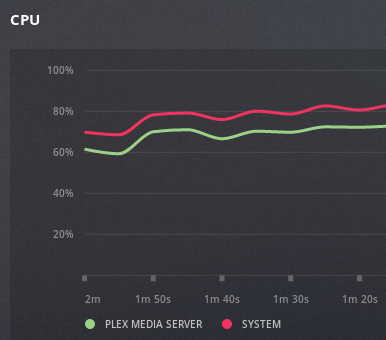
running 5 simultaneous 1080p transcodes on a GTX1060 now (if I want it to…total overkill as usual but hey… ;)
find out what directory nvidia is installed (CACHEDEV2 for me) and add the lib directory to the dynamic linker ld.so.conf
[admin@xxxxlib]# export TERM=xterm-256color
[admin@xxxxlib]# vim /etc/ld.so.conf
add at the bottom:
/share/CACHEDEV2_DATA/.qpkg/NVIDIA_GPU_DRV/usr/lib
then run ldconfig
[admin@xxxxlib]# ldconfig
thanks, https://blog.slowb.ro/fix-terminal-capability-cm-required/
now nvidia-smi should work:
[admin@NAS65211F bin]# ./nvidia-smi
Sat Dec 2 10:11:46 2023
+-----------------------------------------------------------------------------+
| NVIDIA-SMI 515.48.07 Driver Version: 515.48.07 CUDA Version: 11.7 |
|-------------------------------+----------------------+----------------------+
| GPU Name Persistence-M| Bus-Id Disp.A | Volatile Uncorr. ECC |
| Fan Temp Perf Pwr:Usage/Cap| Memory-Usage | GPU-Util Compute M. |
| | | MIG M. |
|===============================+======================+======================|
| 0 NVIDIA GeForce … Off | 00000000:01:00.0 Off | N/A |
| 40% 29C P8 N/A / 75W | 4MiB / 4096MiB | 0% Default |
| | | N/A |
+-------------------------------+----------------------+----------------------+
+—————————————————————————–+
| Processes: |
| GPU GI CI PID Type Process name GPU Memory |
| ID ID Usage |
|=============================================================================|
| No running processes found |
+—————————————————————————–+
[admin@NAS65211F bin]#
check the driver version, download and install the patch:
https://github.com/keylase/nvidia-patch
for some reason the automatic patching does not work anymore so its manual now.
https://emby.media/community/index.php?/topic/102522-tips-to-get-the-most-out-of-your-nvidia-gpu/
not in the mood right now. fuck nvidia
I have been busy for a while figuring out just how much freedom and control I need to use to keep my children from harm from the online world.. after all I know how much trolling is going on and how much hate is being generated/amplified there.
At the same time I am still that blind optimist that believes as long as people talk to each other eventually the good guys will pravail and win because they work together.
Now, with facebook and google using smart algorithms mining big data that they generate from millions of hosts and applying that with addiction-generating systems that generate revenue.. I must admit that is a) very smart, b) a dick move and by all means c) unacceptable if it happens on the back of innocent, uncorrupted and ignorant beings (namely my children)
so I have been using google family link to control the devices of my kids for a while now.
I don’t care what websites they use and who they chat with, they need to learn that some people don’t want to be your friend themselves.
But I have created a blacklist that contains three words:
– youtube
– instagram
– facebook
these three started out wonderful and creative and are now what McDonalds feels like. Fat, lethargic and only interested in making more money. In my eyes they don’t exist anymore but I realize how much the peers of my children are pushing them back and always back again into these platforms.
Everyone who knows a bit about data mining will understand that even without a facebook account, the fact that 5 of your friends have one and they have your number in their address book, that facebook app has access to that address book (to help you “find your friends faster”) and that they get location and demographic information about you by banner ads and tracking cookies that are sent to your device will pretty much tell them all about you without you having an account. It is highly efficient and super scary.
So… while I can more or less control the mobile devices I can not do this for the PC at home.
Also I was looking for a time keeper to control how many hours they are busy.
(Again.. I don’t care if it’s music videos, reddit or minecraft.. but there has to be a balance)
Also laptops can be carried to the neighbors, so installing a pi-hole or DNS blocklists won’t work once they are at the neighbors, whos mother things I am paranoid (I am!) so.. another solution was needed. > see below
2019 – ubuntu is now using systemd (18.04LTS), my home server is running a ryzen processor, CIFS is almost as fast as NFS now and the automated rsync jobs have stopped.
Time to re-build them!
Note: This is a closed system, I am not taking care of security here much as my network is considered “secure” – this is probably not going to win many security awards
Ubuntu 18.04 uses systemd and netplan so no more hacking around /etc/network/interfaces. The config is in /etc/netplan – the default file is 50-cloud-init.yaml
network:
     version: 2
     ethernets:
         enp2s0:
             dhcp4: false
             addresses:
             - 10.0.0.2/24
             mtu: 9000
and apply the settings with sudo netplan apply
and verify withip addrST,UP,LOWER_UP> mtu 1500 qdisc fq_codel state UP
however, this did not bring the mtu to 9000 so we need another thing:> sudo ip link set mtu 9000 enp2s0
and from what I hear this may not be transitory / survive reboots.. in that case it needs to go into the startup scripts.
Anyway: that’s what I wanted: enp2s0: MULTICAST,UP,LOWER_UP> mtu 9000 qdisc fq_codel state UP
verify shares are working (NFS and CIFS)
andreas@plexcloud:/$ showmount -e 10.0.0.1
 Export list for 10.0.0.1:
 /shares/public  *
 /shares/andreas *
 andreas@plexcloud:/$ smbclient -L //10.0.0.1 -U andreas
 WARNING: The "syslog" option is deprecated
 Enter WORKGROUP\andreas's password:
Sharename Type Comment --------- ---- ------- public Disk public andreas Disk Andreas sein Zeug
try to mount is manually: (as root because I will mount using fstab later)
root@plexcloud:~# mount -t cifs -o username=andreas,password=xxxxxxxxxxxx,iocharset=utf8,file_mode=0777,dir_mode=0777,soft,user,noperm,vers=1.0 //10.0.0.1/public /mnt/NAS/

root@plexcloud:~# ls /mnt/NAS
[data]
actually. it’s 2019.. I changed my mind wrt fstab.. let’s use automount (As I never know if my NAS will be up or not while I move to my new place)
https://help.ubuntu.com/community/Autofs <<< that’s supposed to be easy?
apt install autofs
edit /etc/auto.master and add the line/mnt /etc/auto.smb
(which should tell autofs to look at /etc/auto.smb and perform its magic in /mnt) – basically mounting SMB shares in the /mnt directory. CIFS would be a better way.. which doesn’t work for me.. so it’s the manual mode for me for now
for the lazy me: edit fstab and add://10.0.0.1/public /mnt/NAS/ cifs username=YOURUSERNAME,password=YOURPASSWORD,iocharset=utf8,file_mode=0777,dir_mode=0777,soft,user,noperm,vers=1.0
vers=1.0 is to bypass the “host is down” error (assuming proper authentication should be used) and the rest is to bypass said authentication and not to fuck around with file permissions (just behave like a fucking USB stick, damn it.. no one else is using you!)
yeah, I know.. “guest” would probably work, too.. but I had bad experiences with permissions afterwards.
so now I have a mountpoint, let’s do backups!
motivation: rsync with delete – whatever I delete from the source can be deleted on the backup, too
full sync for the server directory, only check by size for the media files
I like -v and “–progress†as it gives me an indication what is going on (on the first run…)
however not in the scripts, a simple –stats will have to do, there…
so for the server backup: rsync -ahv /var/lib/plexmediaserver/ /mnt/NAS/backups/plexmediaserver/ --progress --delete --stats --dry-run
non-verbose and “live” mode: rsync -a /var/lib/plexmediaserver/ /mnt/nas/backups/plexmediaserver/ –delete
(I removed the -z because the data dir is 7 GB and the compression too too long on that stupid atom-based nas)
and for files:
rsync -ahv /plex/ /mnt/NAS/plex/ --progress --size-only --delete --stats --dry-run
and non-verbose: rsync -aq /plex/ /mnt/NAS/plex/ --size-only --delete
first version of the script used copy but this took AGES to finish so rsync all the way now. After all it seems my old seagate NAS does rsync :D
the /var/lib/plexmediaserver dir still takes way too long.. so I will tar and zip it and rsync it over instead – much faster – also –delete-source-files is handy (as mv can not overwrite and I don’t feel good calling rm -rf in a script executed by root….)
tar -zcvf plexmediaserver.tar.gz /var/lib/plexmediaserver/
finished script: added to crontab
0 4 * * * cd /home/andreas && sh backup_plex.sh>>plex_backup.log
#!/bin/bash

echo "+++stopping plex media server"

systemctl stop plexmediaserver.service

sleep 5

echo "+++backing up server and cache"

#rsync -ahz /var/lib/plexmediaserver/ /mnt/NAS/backups/plexmediaserver/ --stats --delete

tar -zcf /opt/plex/plexmediaserver.tar.gz /var/lib/plexmediaserver/

echo "+++copying tarball over to NAS"

#rsync -ahv /opt/plex/ /mnt/NAS/backups/plex/ --remove-source-files --progress --stats

rsync -ah /opt/plex/ /mnt/NAS/backups/plex/ --remove-source-files

echo "+++restarting plex media server"

systemctl start plexmediaserver.service

echo "+++server backup complete - now for the files"

#rsync -ahv /plex/ /mnt/NAS/plex/ --progress --size-only --delete --stats

rsync -ah /plex/ /mnt/NAS/plex/ --size-only --delete