I might actually give unibeast a try…
http://www.tonymacx86.com/61-unibeast-install-os-x-mountain-lion-any-supported-intel-based-pc.html
Category Archives: personal
OUTDATED – customizing Ubuntu GNOME
this is no longer relevant – Ubuntu Gnome is now quite mature and doesn’t need these teaks anymore…
I recently switched to Ubuntu GNOME (as I remove Unity all the time anyway)
Soooo.. here the recipe for “my” Ubuntu:
1) install Ubuntu GNOME distro
2) enable partner and proposed updates
Software updater > Settings > Software sources > Tab “updates” and enable backports and proposed
Close and run a update and upgrade cycle
2a) for Compaq 6910p: (high speed fans on after resume)
sees this is fixed in Kernel 3.9 but tuxonice depends on 3.8 so will have to work around:
Create the file â€/etc/pm/sleep.d/99fancontrol.shâ€, insert the code below and chmod 755 it. Script:
make worker script /bin/fan.sh
#!/bin/bash
# fan spindown for hp nx9420
# @see https://bugzilla.redhat.com/show_bug.cgi?id=895276#c18
cd /sys/class/thermal/
echo 0 > cooling_device0/cur_state
echo 0 > cooling_device1/cur_state
echo 0 > cooling_device2/cur_state
echo 0 > cooling_device3/cur_state
echo 0 > cooling_device4/cur_state
echo 0 > cooling_device5/cur_state
echo 0 > cooling_device6/cur_state
# optional
# echo 0 > cooling_device7/cur_state
# echo 0 > cooling_device8/cur_state
# echo 0 > cooling_device9/cur_statemake controller script /etc/pm/sleep.d/99_fan
#!/bin/sh
# fan spindown controller script
# @see https://bugzilla.redhat.com/show_bug.cgi?id=895276#c18
case “$1” in
hibernate|suspend)
;;
thaw|resume)
/bin/fan.sh
;;
*) exit $NA
;;
esacmake both scripts runnable:
chmod +x /bin/fan.sh
chmod +x /etc/pm/sleep.d/99_fanWhen computer goes from sleep the power management runs all /etc/pm/sleep.d/ scripts. The fan will spin down.
The script is run as root so we don’t need to make sudo magic here.
The spindown takes few seconds so one can hopefully hear when this bug is fixed and the fan won’t go crazy right after resume.
3) Use ubuntuguide.org to get valuable input such as:
ubuntu-restricted-extras
GnomeDo, STEAM, X-chat, Pidgin (with OTR support), Thunderbird, Enigmail, Adblock/Flashblock/HTTPS everywhere, audacious, VLC, f.lux
and remove openoffice stuff, etc..
Import your GPG keys and certificates
4) install tuxonice / re-enable suspend in the menus
disable encryped swap
http://codenachos.com/view/ubuntu-enable-and-disable-swap-encryption
#enable encryption
sudo ecryptfs-setup-swap
#disable encryption (allows hibernation)
sudo swapoff -a
sudo cryptsetup remove /dev/mapper/cryptswap1
sudo cp /etc/crypttab /etc/crypttab_bk
sudo vim /etc/crypttab
#remove the /dev/sda5 line
sudo /sbin/mkswap /dev/sda5
sudo swapon /dev/sda5
sudo cp /etc/fstab /etc/fstab_bk
sudo vim /etc/fstab
#replace /dev/mapper/cryptswap1 with /dev/sda5 (or the correct UUID)
replace menus
create file: /var/lib/polkit-1/localauthority/50-local.d/hibernate.pkla
add this:
[Re-enable Hibernate]
Identity=unix-user:*
Action=org.freedesktop.upower.hibernate
ResultActive=yes
this should allow hibernation
check ‘sudo pm-hibernate’ if everything works – consider installing “hibernate” package
cosmetic stuff:
gconftool-2 -s /apps/gnome-session/options/show_splash_screen -t bool false
also remove quiet and splash from grub (using grub-customizer?)
bonus:
https://extensions.gnome.org/extension/5/alternative-status-menu/
new mail server
I will be starting have started setting up a new mail communications server to move to something a little more independent than Google
the server should have:
email support
frontend / web login
smartphone interface / app
calendar
addressbook
owncloud! see dropbox
then there should be
irc
disapora
xmpp > ejabberd or prosody
config: http://wiki.ubuntuusers.de/ejabberd
https://prosody.im/doc/install
backup MX and rsync to some other server must be there
zimbra open source edition looks nice
webmind offers puscii
>> iredmail with squirrel and/or roundcube
tor exit node?
https://www.torproject.org/eff/tor-legal-faq.html.en
https://blog.torproject.org/blog/tips-running-exit-node-minimal-harassment
https://www.torservers.net/wiki/abuse/templates
useful to play with screen and irssi:
http://quadpoint.org/articles/irssi/
better: quassel!
souvereign draaiboek / ansible playlist
BUILD install: see playlist
Lautsprecher einstellen
bike 2013
just want to have fun – see this:
and for me:
btwin riverside 3

if only on the road it would be this:
btwin fitness 3

Vincents Schritthöhe: 54cm – Rahmenhöhe Trekking: 31cm / 12″
Meine Schritthöhe: 79cm – Rahmenhöhe Trekking: 52cm / 20″ (fuer racebikes: 54cm / 21″)
zumindest wenn man fahrrad.de und Keepiru glauben kann. :)
full Gnome3 in Ubuntu 12.10
This website
shows nicely how to remove Ubuntu artwork and get a “normal” Gnome Desktop :)
here’s how:
sudo apt-get install ubuntu-gnome-desktop ubuntu-gnome-default-settings
select “GDM” as default (sudo dpkg-reconfigure gdm)
sudo apt-get remove ubuntu-settings
sudo apt-get install gnome-documents gnome-boxes
and if you want to go extra cutting edge:
sudo add-apt-repository ppa:gnome3-team/gnome3
sudo apt-get update/upgrade
sudo apt-get remove overlay-scrollbar*
at first login set “Gnome” as the default session
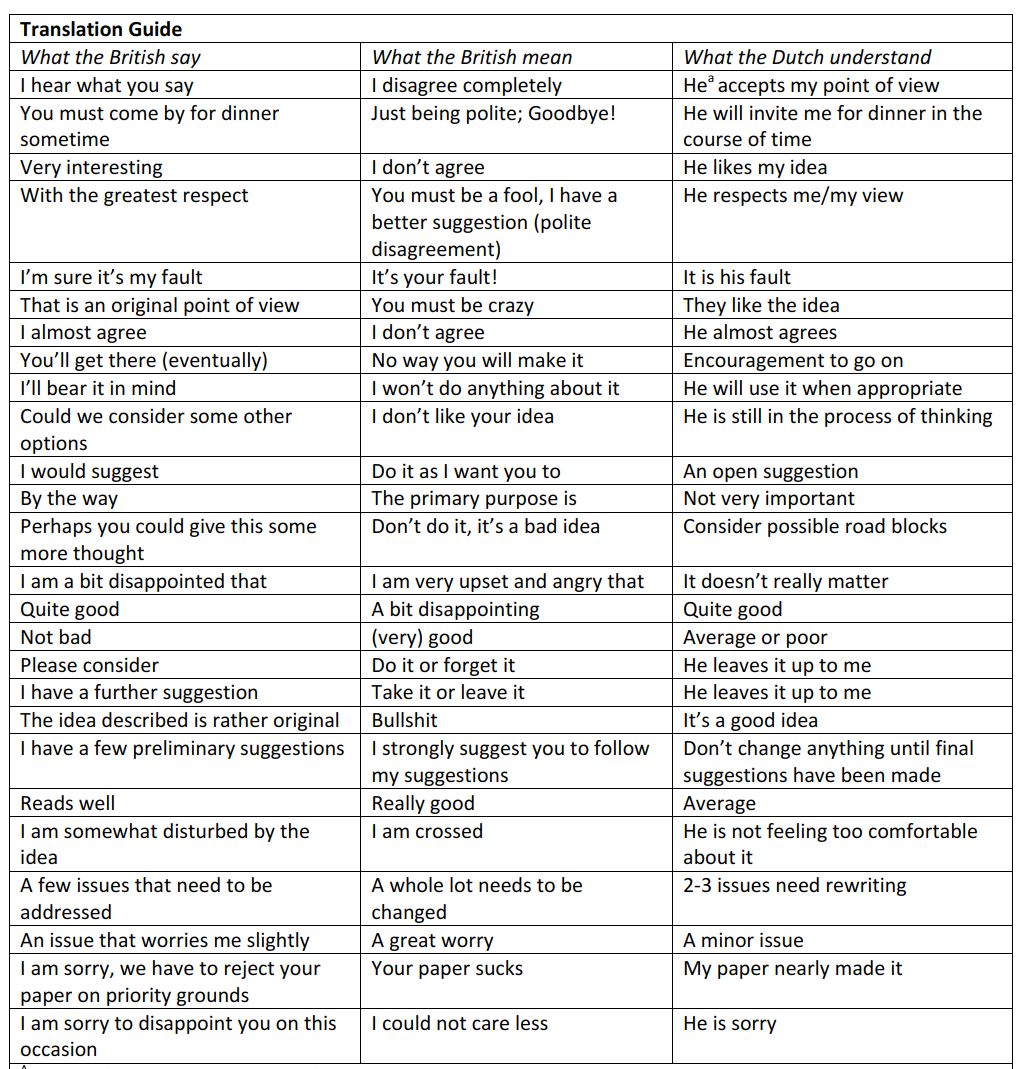
ANGLO-DUTCH translation guide
Anglo-Dutch-Translation-Guidehere is for everyone who ever had to work across the water with the British…
(works for Germans, too…)

download an extended PDF version (Credit to the creators inside) here:
xbox360 revival
it seems unbelievable but I actually managed to revive two xbox 360 consoles from the RROD death
using these guides (attached as PDF) – it can be done!
so far I have refused to drill holes and replace the X-clamps with screws but I might do that in the future
just used fresh thermal compound and bent the x-clamps to clamp a bit tighter on that heatsink (eliminating any movement)
I did do the overheating part, just to torture the console a bit :P
the airflow guide is also something I will do tonight, can’t hurt :P
http://www.instructables.com/id/Fix-the-Red-Ring-of-Deathwithout-towels/
original instructions and opening guide:
http://www.llamma.com/xbox360/repair/xbox-360-repair.htm
http://www.llamma.com/xbox360/repair/ring_of_light_x-clamp_fix.htm
http://www.llamma.com/xbox360/repair/Xbox-360-Disassembly.htm
techie Wish-List (for 2012)
XBOX 360 with 2 controllers and Skyrim (249,- Euro)
http://www.mediamarkt.nl/mcs/product/MICROSOFT-Xbox-360-250GB-Starter-Pack,10259,350957,449704.html
Apple TV (99,- Euro)
http://store.apple.com/us/browse/home/shop_ipod/family/apple_tv
NAS project (560,- Euro)
https://plus.google.com/u/0/106273092865405563044/posts/PkaWvSpkqqe
foggy mirror
after showering, the mirror foggy, Vincent starts drawing in the condensed water… pirates, dragons, but today was different
*draws a heart*
“This is you, Mama”
“Oh, am I holding flowers?”
“Yes, and this is me, I was just born”
*draws a bigger heart*
“And this is you and Papa when you get married. Papa is dressed up like a cat and is dancing; you are dancing aswell.”
*draws a cat*
“When you married you got a litle cat to take care of.”
*draws an even bigger heart*
“Now I will draw an even bigger heart”
*draws two people holding hands*
“This is papa, with cool hair, and this is you, we got puppies to take care of”
*draws three dogs and two humans*
“And this is me as a KungFu tiger (the second level in the school) and this is Kaya as a KungFu Panda!” (the baby group in the KungFu school – he wants her to train there aswell)
“And when you married everyone said ‘what a cool guy!'”